
How to Automate Business Processes With AI: Rules, AI and People
AI & automation
Product development
Updated: November 18, 2026 | Published: November 17, 2026

Key Takeaways
Split a process step by step: rules and software take the fixed steps, AI takes the steps that read or judge, and people keep the costly decisions.
Check existing platforms before you build custom, and keep the official records in your own systems.
Test each AI step on past cases against a pass mark set in advance, then time checked drafts against work done by hand.
Check every case whose error would be costly or hard to reverse, and check less only where errors are cheap, caught later and rare in your measurements.
The checking that stays with your team can decide whether the automation pays, and freed hours count as money only when they replace spending.
Only 30% of organizations are redesigning key processes around AI, and 37% report using it only at a surface level, according to Deloitte's 2026 State of AI report. That's where AI business process automation can go wrong: a model added to a workflow that otherwise stays the same.
Avoiding this starts with the split between rules and software, AI and people, which sets how much checking stays with your team. That checking can decide whether the automation saves anything.
This guide follows one real example of business process automation through 6 decisions: the UK Foreign Office's correspondence triage. It sorts a public and parliamentary mailbox that works much like a customer-service inbox. Its design, owner, human review and risks are on a public record, but its costs aren't, so Step 6 uses an illustrative cost model.
The method comes from how we build AI processes ourselves, such as the pipeline that drafts an AI Scope Document from a visitor's project brief, where 4 controls sit around the model that writes it.
What Is AI Business Process Automation?
AI business process automation is the use of AI models for the steps of a business process that need reading or judgment, such as classifying a request or drafting a reply. Rules and software still handle the predictable steps, and people keep the consequential decisions.
Robotic process automation (RPA) follows fixed instructions on structured screens and data. AI vs RPA comes down to a division of labor: AI reads unstructured input, such as an email, and an RPA bot moves the result through your systems.
The UK Foreign, Commonwealth & Development Office (FCDO), the Foreign Office for short, runs that division on a real inbox. Its mailbox has received an average of 30,540 emails a month since March 2024, according to its algorithmic transparency record, and a crisis can bring a surge.
Staff used to identify each email's fields and categories by hand, with automation filling in only basics such as the sender's name. Now the tool labels every email and logs a case where one is needed, and staff still prepare, sign off and release every reply.
The 6 Decisions in AI Process Automation, in Order
Here's how to automate business processes with AI, in 6 decisions made in order:
Choose the process and measure it: volume, minutes and errors for each type of case.
Split the work: each step goes to rules and software, to AI or to a person.
Pick the build path: a platform if one meets your requirements, a custom build if none does.
Test before go-live: pass marks on past cases, then a timed trial.
Set review and ownership: what people check, and who owns the result.
Check that it pays: the cost per handled case against today's, and the payback.
Step 1: Choose the Process to Automate, and Measure It First
Pick a high-volume process whose steps mostly read, sort or record information and whose errors are cheap to catch, then measure it before you build anything.
Good first candidates share one shape: AI reads and sorts, software does the fixed steps, such as matching an invoice to its purchase order, and a person keeps the step where an error costs most.
Process | AI does | A person keeps | Costly error |
|---|---|---|---|
Support inbox | Sorts requests and drafts replies | Sending replies | A wrong answer to a customer |
Supplier invoices | Reads invoices into fields | Approving payment | Paying the wrong amount |
Customer onboarding | Checks documents for gaps | Approving the account | Approving an account that fails checks |
IT service desk | Sorts tickets and suggests fixes | Changing access | A wrong access change |
Inbound leads | Scores each inquiry's fit | Choosing who sales calls | A good lead scored low |
To test your own candidate, list every step a person does today and mark it as fixed logic, reading or judgment, or a costly decision; if most are costly decisions, pick another process. Don't automate broken business processes: if the steps change from person to person, fix the process first.
The Foreign Office's triage fits: every email needs the same fields identified, and the reply stays with staff.
Sort cases into case types as you go, meaning groups that need the same handling, such as refunds, address changes and complaints. Every later test and review rule runs per type, so take a baseline for each one:
Volume: cases per month, and the peaks.
Minutes per case: from timing a sample over a week or two.
Error rate: how often a case goes wrong, and what one error costs to fix.
Cost per minute: loaded, with employer costs and overheads on top of salary.
Measure today's errors the way you'll measure the AI's: the same reviewer checks a random sample of hand-done cases against the checklist you'll use on AI drafts. Then run Step 6's cost table on the baseline before you fund anything. If the saving vanishes at a checking time you'd expect, choose another process.
Step 2: Split the Work Between Rules, AI and People
Split the process one step at a time: fixed logic goes to rules and software, reading and judgment go to AI with a person checking, and costly decisions stay with people.
The Foreign Office's triage puts AI on every step that reads an email and keeps people on the reply, as its transparency record shows:
FCDO step | Who does it | Why |
|---|---|---|
Spam and firewall filters | Standard email software | Standard filtering, before the tool sees the email |
Extracting names, addresses and references | AI, checked by the assigned staff member | Reading varied text |
Classifying the request and where to forward it | AI, checked by the assigned staff member | Judgment on varied text |
Flagging emails that need no reply, suggesting standard replies | AI, checked by staff | A suggestion a person confirms |
Logging the case where one is needed | Software (an RPA bot) | Fixed steps in the case system |
Preparing, signing off and releasing the reply | People | The step with the most at stake |
Staff review every email after triage, the bot's logging included, and the record says all information is peer reviewed by people before a reply goes to a member of the public.
Our own AI Scope Document process calls a model in only 7 of its 22 steps. Of those 7, 2 run only when a fixed check finds a problem, such as a link that doesn't lead to real DBB Software content or an approved site, which a model then replaces or removes. No person checks each document before it goes out, so its cover says an engineer hasn't reviewed it yet and names the Product Discovery Phase as the step where our team validates it.
When Should an AI Agent Run More of a Business Process?
Give an AI agent more of a business process only where its steps can't be predicted, its errors are cheap and caught downstream, and its correction rate stays low on measured cases. An agent here means a model that decides its own next steps and acts in your systems.
Even the model providers argue for restraint. In its guide to building effective agents, Anthropic recommends "finding the simplest solution possible, and only increasing complexity when needed," which "might mean not building agentic systems at all."
OpenAI's guide to building agents recommends them for workflows with complex decisions, rules that are hard to maintain or heavy reliance on unstructured data, and says that otherwise "a deterministic solution may suffice." Unstructured input on its own can stay in a fixed workflow, though: the Foreign Office's emails are unstructured, and a model on each reading step handles them.
Removing the person saves checking time but lets through the errors the check would catch, and Step 6 prices that trade-off.
Step 3: Evaluate Platforms First, Then Connect the Workflow to Your Systems
Check existing automation platforms against 4 requirements before you build anything custom, and keep your system of record, the one holding the official version of each case, as the authority.
The 4 requirements are:
Control: who can change the workflow and its permissions, where your data goes and for how long, and whether you can stay on one model version until you've retested its replacement.
Integration: whether it reaches the systems the work lives in, such as your customer relationship management (CRM), enterprise resource planning (ERP) or case system.
Capability: whether it handles your inputs and case types, messy ones included.
Economics: what it costs at your volume, usage fees included.
The Foreign Office took the platform route with a partner. A supplier that had built a similar tool for another department built this one on Microsoft's Power Automate and AI Builder, and the record says hiring it through a framework agreement "saved at least 8 months of development time."
The Foreign Office chose the approach partly because it allowed "custom models for each of the subproblems" and could handle a crisis surge "at no additional cost," its own capability and economics tests. The bot logs cases in a separate case-management system, eCase, and the tool keeps the personal data it reads for only 60 days.
The platforms you'll compare come in a few types, and many processes combine 2:
AI features in tools you already run: help desks, CRMs and finance systems that sort or draft.
Workflow automation tools: connect your apps and add AI steps, as Microsoft's Power Automate does.
Document AI: turns invoices, forms and scanned letters into fields.
RPA: works through the screens of older systems that nothing else can connect to.
Process orchestration: runs long processes with approvals and an audit trail.
Agent builders: let a model choose its own steps; use them only where Step 2's agent test holds.
Keep permissions outside the AI, too. The security nonprofit OWASP traces excessive agency to an AI with more functions, permissions or autonomy than its task needs, and says your own systems should decide what the AI may do. In its email-assistant example, any of 3 fixes stops the attack: an extension that can only read mail, read-only mailbox access, or a person who reviews and sends every draft.
The care-request application programming interface (API) we built for a client's voice-AI intake agent works the same way: the agent connects only with credentials we issued, from one approved server. Because the API describes the care-request workflow rather than one vendor's setup, a second voice vendor took over the calls without a rebuild of intake, and the client's system of record was untouched.
Before you shortlist a platform or a partner, ask them to show 5 failures in a demo:
a broken input
a system that doesn't respond
a missing connection
a result the AI isn't sure of
a draft your reviewer rejects
Then check that a step retried after a failure can't write the same case into your system twice.
Automating a workflow your team runs by hand?
See how we build AI process automation into the systems you already use, starting with a free AI Scope Document of your process.
Explore AI process automation services
Step 4: Test on Past Cases and in a Timed Trial Before Go-Live
Test rules with ordinary software tests, each AI step on past cases whose right answers you know, and the whole workflow in a timed trial where a person checks every draft.
The right answers usually exist already: they're the values your team entered in the system of record, once an expert has re-checked a sample. For drafted text, the right answer is a short checklist an expert marks each draft against, such as:
the right category
facts that match the source
the right next step
Set a pass mark for each AI step and case type before the run, such as the share of cases it gets right without correction, so the results can't move the bar. Set it higher where errors cost more. The whole workflow, after checking, should make no more errors than your team makes today.
The Foreign Office's record shows why each step needs its own pass mark. Its newer email-category classifier is listed at about 0.6 accuracy and an earlier model at about 0.34, while other steps report 0.9 and 0.95 in user-acceptance testing. The record doesn't give enough testing detail to compare these figures directly.
They do show that a workflow can deliver value without every AI step being highly accurate, if it's built around the misses. The classifier at about 0.6 works here only because staff review every email and can overwrite what it predicted. A step whose output nobody checks needs a much higher pass mark.
Then run a timed trial on incoming cases:
Split them into 2 groups: in one, a person checks and corrects the AI's draft; the other is handled by hand as usual.
Assign cases at random, or by alternating, within each case type, so both groups get the same mix. Otherwise an easier batch can make the AI look faster than it is.
Time both groups by case type, and count the corrections.
Have your Step 1 reviewer check a random sample of finished cases from both groups, and note the cases the AI can't handle.
Run until each case type has enough cases to judge, rather than for a set number of weeks. Our guide to how many test cases an AI step needs before release works through the number.
To turn that into weeks, divide the cases you need per type by how many reach the checked group each week: 60 cases at 15 a week takes 4 weeks, and the rarest type you include sets the trial's length. Budget the expert's and the reviewer's hours, too.
A newer model isn't always a better one. Coinbase compared older and newer versions of 3 model families on its own fraud benchmark and reports that in all 3 pairs, "the newer version had lower recall," meaning each newer version caught fewer of the real fraud cases. So re-test every AI step after each change. Before we change the prompts or models behind our AI Scope Documents, a person runs a fixed set of test briefs and compares the scores.
Go live only if all 3 of these hold:
every AI step meets its pass mark;
the checked group makes no more errors than the by-hand group;
the time saved covers the running costs.
Step 5: Go Live With the Right Level of Review and a Named Owner
Go live with review set by case type, people approving consequential actions, one named owner for accuracy and cost, and a way back to manual work if the tool fails.
Your team's job changes on day one, from doing cases to checking them and handling exceptions. Train everyone who'll use the tool, as the Foreign Office does through onboarding, and bring in IT, security and data protection before launch. Decide in advance where the freed hours go, such as less overtime or a hire you no longer need.
How Much of the AI's Work Should People Check?
In human-in-the-loop automation, people should check every case where an error would be costly or hard to reverse, such as anything that moves money, changes access or can't be undone, and every case type your testing hasn't covered. Check less only where errors are cheap and caught later, and only while correction rates stay low.
The Foreign Office sits at the full-review end. In a live AI assistant we built for a client's tournament platform, review follows the risk instead. The client's product team tests and approves every change to the assistant's prompts before it reaches production, and items that an AI step sorts with a low confidence score go to a person.
Three habits keep the check real:
Test confidence scores before you trust them: routing only low-confidence items works once your past cases show that low scores really mark the wrong answers.
Show reviewers the source next to the AI's draft, so checking means comparing.
Watch correction rates by case type: a rate near zero on hard cases can mean people have stopped reading.
To check less on a case type, first check about 60 random cases of it. If none needs a correction, you can say with about 95% confidence that under 5% of that type need correcting, whether you handle 100 or 20,000 cases a month. That's the statistical rule of three, which our AI pilot guide applies to test sets. Before you rely on the count:
Use cases picked at random from normal work, checked by reviewers who catch errors. You can test the reviewers with a few planted mistakes.
Investigate any correction you find. The cases before it still count, but with 1 correction you need about 93 cases in total to make the same under-5% claim.
Repeat the evaluation after a substantive change to the model, the prompt or the inputs, because the earlier cases describe a different system.
Even then, what an error costs still decides whether to check less.
Decisions with legal or similarly significant effects on a person, such as refusing an online credit application, need a person involved in each one, or they count as solely automated. The EU's General Data Protection Regulation (GDPR) allows those only under one of the exceptions in its Article 22, with safeguards. The UK sets its own restrictions and safeguards in Articles 22A to 22D of the UK GDPR, which count a decision as solely automated when there's "no meaningful human involvement in the taking of the decision." Elsewhere, check local rules.
Start with wide review, measure it, and narrow it one case type at a time.
Who Owns the Automation After Go-Live?
One named person in the team that runs the process should own the automation's accuracy and cost, re-run the test cases whenever the model, a prompt or the inputs change, and keep a manual fallback. Ask your platform or partner to warn you before a model changes.
The Foreign Office names a senior responsible owner, the Head of Parliamentary Office, with a project team monitoring performance. Weekly automated tests in a test environment alert the supplier to errors in the bot's process, and the record warns that staff "may need to return to manual processes if the tool is offline."
Someone also has to turn corrections into improvements: log each one next to the AI's draft, turn approved ones into prompt examples or rule changes, re-run the test set and release the new version. Step 6 counts those hours as oversight.
If nobody can say who would switch the automation off, it isn't ready to widen.
Step 6: Work Out the Cost per Case and the Payback Before You Scale the Automation
To judge the return on investment (ROI) of AI business process automation, work out 2 numbers: what a handled case costs against today's cost, and how many months the one-off cost takes to pay back.
The Foreign Office publishes neither. Its record says the tool saves "several hours of manual work per day for multiple team members," which is capacity rather than cash, and mentions cost-saving calculations without publishing them.
The cost per handled case is the average cost of getting one case done, with checking, corrections, errors that get through and running costs included. Here it is for an illustrative process like the Foreign Office's, handling 3,000 cases a month with staff time at a loaded $0.80 a minute. The inputs are invented, so none of the values is a result:
Line | How it's worked | With AI | By hand |
|---|---|---|---|
Usage | Model and platform fees per case | $0.05 | $0 |
Checking | 2 minutes × $0.80 | $1.60 | $0 |
Corrections | 15% of cases × 3 minutes × $0.80 | $0.36 | $0 |
Doing the case | 6 minutes × $0.80 | $0 | $4.80 |
Errors that get through | 1% with AI, 3% by hand, × $8 to fix | $0.08 | $0.24 |
Fixed running cost | $3,000 a month of platform fees, monitoring and support ÷ 3,000 cases | $1.00 | $0 |
Oversight | 20 hours a month of owner time, audits of finished cases and re-tests at $48 an hour ÷ 3,000 cases | $0.32 | $0 |
Cost per handled case | Sum of the lines | $3.41 | $5.04 |
With these inputs, a case costs $3.41 with AI and $5.04 by hand, a modeled difference of $1.63 a case, or $4,890 a month. Oversight doesn't count the checking twice: checking is the 2 minutes a person spends on every draft, while oversight covers the owner's management time, audits of a sample of finished cases and re-tests after changes.
The example assumes no fallbacks; a case the AI can't handle costs the attempt plus the full manual handling, so give fallbacks their own line.
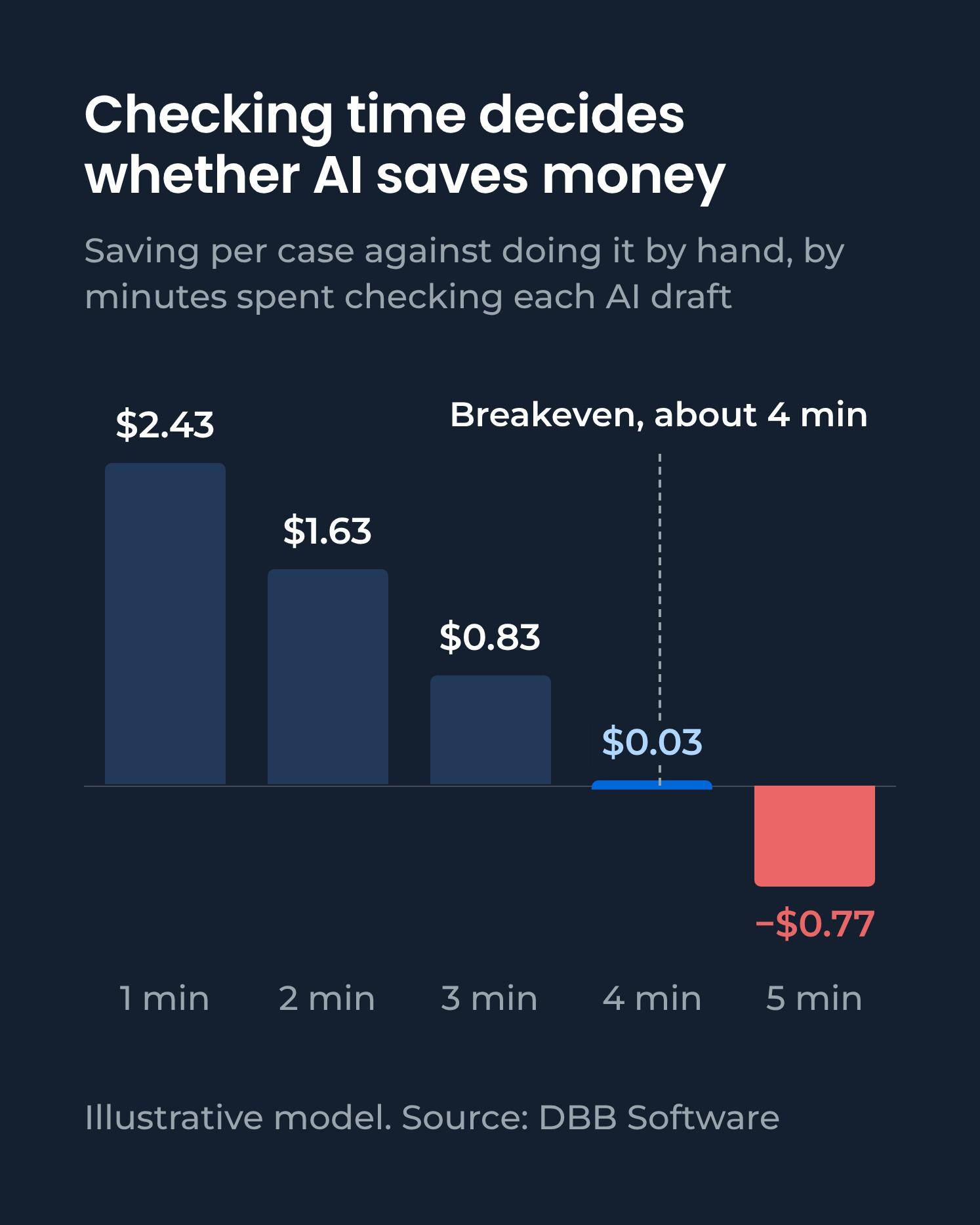
Checking time decides the result, because each extra minute costs $0.80 a case. The difference is $2.43 a case at 1 minute of checking, $1.63 at 2, $0.83 at 3, $0.03 at 4 and −$0.77 at 5. Above about 4 minutes on a 6-minute task, the automation costs more than doing the work by hand. Doubling the usage cost moves it by only 5 cents. Volume matters too: at 1,000 cases a month, fixed costs and oversight push a case to $6.05 with AI against $5.04 by hand.
Treat the payback as conditional and illustrative, not a demonstrated cash payback, because most of the modeled benefit is staff time. Saving 3.55 minutes on each of 3,000 cases frees 177.5 hours a month, and oversight uses 20 of them:
Line | Illustrative | Cash? |
|---|---|---|
157.5 staff hours freed | $7,560 | Only if spending stops |
60 fewer errors to fix | $480 | Only if fixing them costs cash |
New running costs | −$3,150 | Yes |
Modeled net benefit | $4,890 | Depends on the lines above |
A cash payback counts only the spending that actually stops. If the freed hours let you drop $6,000 a month of overtime and agency staff, and the avoided errors save no cash, the cash saving is $2,850 a month. If less than $3,150 a month of spending stops, about 66 hours at this rate, the automation adds cash costs and returns capacity instead. Oversight here is your own team's time; if you pay for it, the cash saving falls to $1,890.
At invented one-off costs of $10,000, $25,000 and $50,000 to build, connect, test and train, the full modeled benefit recovers them in about 2, 5 and 10 months, and the $2,850 cash saving in about 3.5, 9 and 17.5 months.
Checking is the largest line on the AI side, so test whether it earns its place. If every correction would otherwise have become an $8 error, dropping the check would cut a case to $2.65 from $3.41, because checking and corrections cost $1.96 a case to stop $1.20 of errors.
On money alone, the check pays only when the average error it stops costs more than about $13. It stays here anyway: without it, 16% of cases would end in an error against 3% today, which fails the Step 4 bar.
Errors that reach customers can cost far more, and a company can be held liable even when its chatbot made them: in 2024, a British Columbia tribunal ordered Air Canada to pay C$812 after its website chatbot gave wrong fare advice.
So, sort your trial's corrections by what each would have cost, and check less only for case types where that total stays well below the cost of checking.
This example counts costs only; if the value is speed, such as avoided late-payment penalties, add it as a line. Then decide:
Widen if the cost per handled case beats today's across the checking times and error costs your trial measured, quality meets the pass mark, and the payback works in cash or in capacity worth its cash cost.
Hold if the result flips between better and worse than today within that range, or quality only just meets the pass mark. Run more cases before you decide.
Stop if a case costs as much with AI as by hand or more, quality stays below the pass mark, or neither the cash payback nor the freed capacity justifies the cash cost.
Where to Start With Your First AI-Automated Process
Start with the first of the 6 decisions your process hasn't been through yet.
If you're still choosing a process:
List a candidate process's steps, and mark each one for rules and software, AI or people.
Measure the best candidate's baseline by case type, and run Step 6's cost table on it.
If your process is mapped and split:
Check platforms against Step 3's 4 requirements and failure demo, and set every AI step's pass mark before the first test case.
Run Step 4's timed trial on a shortlisted platform or a small prototype before you commit to a full build or a long contract.
If a pilot is already running:
Work out the cost per handled case and the conditional payback from Step 6.
Decide where the freed hours go before you widen it.
Ready to look at a real process? Tell us about the workflow you're running, the systems it touches and what isn't working, and we'll come back within one business day with an honest assessment and, if it's a good fit, an initial cost estimate.
If the workflow needs designing first, we'll suggest our Product Discovery Phase, where 2 tech leads prepare a Software Design Document (SDD) before anything is built.
FAQ


Content Marketing Manager, Researcher