
AI Pilot to Production: What It Takes to Make an AI Feature Customer-Ready
AI
Product development
Updated: November 12, 2026 | Published: November 11, 2026

Key Takeaways
A working AI pilot proves the idea can work. Production needs 3 more things: proof that the AI handles real customer needs, engineering that keeps it reliable, and an agreed list of what must be true before launch.
Write pass/fail acceptance criteria that the business owns before you judge or rebuild the prototype, and test them on cases built from real inputs, including the hard ones the demo avoided.
Decide whether to keep, harden or rebuild the prototype from test results. Its test cases and lessons usually survive even when its code doesn't.
Enforce permissions, customer data separation and business rules in code, because a prompt can't enforce them when the model is mistaken or manipulated.
Before launch, run a readiness review with evidence and an owner for each requirement, plus a named person who can pause the feature.
In ICONIQ's July 2026 survey of about 300 software executives, 67% said AI quality problems were caught through user feedback. If your pilot works and outside customers are next, the move from AI pilot to production is your chance to find those problems before customers do.
A pilot can be a working prototype or an early version tested with a few design partners. Either one shows the idea can work. Getting it into production means proving the AI can handle real customer requests, building the engineering around it so it runs reliably, and agreeing on what must be true before launch.
This guide covers 8 changes between a working pilot and production, how to verify each one, the customer-facing requirements and a readiness checklist for your go/no-go review.
The examples come from DBB Software projects: AI hotel search now running on a travel agency's website, and our own AI chatbot, whose production traces revealed problems after launch.
AI PoC to Production: What Changes Before Customers Use It
Moving an AI proof of concept (PoC) into production means replacing informal checks with written acceptance criteria and repeatable evaluations, then adding the controls needed for real customers. The table shows 8 changes, from permissions and data isolation to performance, change control and monitoring.
In the pilot | In production |
|---|---|
Outputs checked by eye | Written acceptance criteria and repeatable checks |
A handful of test prompts that worked | Evaluation cases from real inputs, rerun on every change |
A model calling a development API | Integrations scoped to the user, with errors and retries handled |
Rules written into the prompt | Rules enforced in code, and human approval where it counts |
One user's test data | Each customer's data kept separate in code |
Fine speed in a demo | Latency and cost tested at expected usage |
Prompts and models changed freely | Versioned prompts and pinned models, with each change re-tested |
Someone watching the demo | Monitoring, a named owner and an off switch |
Most of the work is in the software around the model. Those controls determine whether customer data stays separated, unauthorized actions are blocked and failures become visible before customers report them.
How to Define Acceptable AI Behavior Before Customers See It
Define acceptable AI behavior with written pass/fail criteria owned by a product or business lead, then test the pilot against cases drawn from real customer inputs. Without both, you can't make a defensible decision about whether the pilot is ready.
Write Pass/Fail Criteria for the Failures You Can't Accept
Write a pass/fail rule for each failure customers can't tolerate, specific enough that 2 reviewers independently reach the same verdict on the same answer.
One person owns the criteria: the product or business owner decides what counts as acceptable, while engineers, support and sales contribute the failures they've seen.
Judge failure types separately: invented facts, nonexistent policies, exposure of another customer's data or actions taken without permission. A single 1–10 quality score can hide which of these happened.
Check completeness as well as correctness: an answer can be accurate and still leave out what the customer needed.
Revise criteria after reading real outputs: what a team considers acceptable can change once it sees actual answers. Hamel Husain and Shreya Shankar call this "criteria drift" and suggest reading 50 to 100 real conversations to find the most common ways the product fails.
We learned the completeness lesson on DBB's own Scope Document, the free project document our website and chatbot generate from a visitor's brief. After a model change, a production test delivered a document marked ready that had no architecture, decision records, team plan or risks, because the schema treated those sections as optional. The document passed validation and still failed its reader, so completeness is now a pass/fail check: when one of those sections is missing, the pipeline generates the document again.
Have 2 people grade the same sample of answers independently. If they disagree, make the criteria more specific.
Build Evaluation Cases From Real Customer Inputs
Build your evaluation set from real inputs: checks your team already runs by hand, design partners' sessions, support tickets and bug reports, plus the hard cases the demo avoided. Each case pairs an input with an expected result, and the set is rerun whenever the feature changes.
Start small and real: Anthropic's engineers write that "20-50 simple tasks drawn from real failures is a great start." Synthetic cases, written by the team or generated by a model, can fill gaps before launch, but Husain and Shankar warn that "synthetic data cannot tell you how common a failure is in production."
Check with code where you can: validate required formats, fields and links, and check for prohibited actions in code. Use an LLM judge (a second large language model that grades answers) only for judgments code can't make, and compare its grades with human ones before you trust it. For example, Shopify's first judges were "barely-better-than-random" until iterative prompting brought them close to human agreement.
Freeze a baseline: record the score your current version gets, so every change can be compared against it.
Even if 30 independent, representative cases all pass, the true failure rate can still be as high as about 9.5% at 95% confidence, based on the rule of three. Ruling out a failure rate above 1% takes about 300 such cases.
Curated test sets are rarely independent or representative, so a few dozen passing cases can't establish reliability across real customer use. Size the set by the claim you need to make, and keep adding failures discovered in production.
Should You Keep, Harden or Rebuild the AI Prototype?
Harden a working AI proof of concept by default, since that keeps what already works, and let your evaluation results decide which parts to rebuild. Keep components that meet your acceptance criteria, harden those that are close, and rebuild parts whose design can't meet them.
What often carries over is what the team learned: test inputs, known failures, data mappings and prompts that can serve as a starting point. Mocked integrations, shortcuts and frameworks that hide the instructions the model actually sees may need replacing.
Two DBB projects show how those decisions play out:
Hardened a working PoC: A talent-acquisition platform came to DBB with a working prototype. The team rebuilt its interface and added user management, data import/export, CI/CD pipelines and automated testing to turn it into an MVP ready for early adopters.
Changed the architecture after testing: The proof of concept for an AI assistant for junior tennis tournaments used one model for planning and another for retrieval and synthesis. As testing widened, a single agent with access to tools performed better on the same conversations. The team adopted that design and reused the test conversations.
Record a keep, harden or rebuild decision for each part of the prototype, supported by the test results behind it.
Not sure how much work your AI pilot needs before launch?
Describe the feature and get a free scope document for the production build: requirements, architecture, risks and milestones.
Get a Free Scope Document
Harden Integrations, Permissions and Controls in Code
Harden a customer-facing AI feature by limiting its tools to the user's permissions, enforcing business rules in code and keeping each customer's data separate. These controls sit around the model, as the diagram shows.
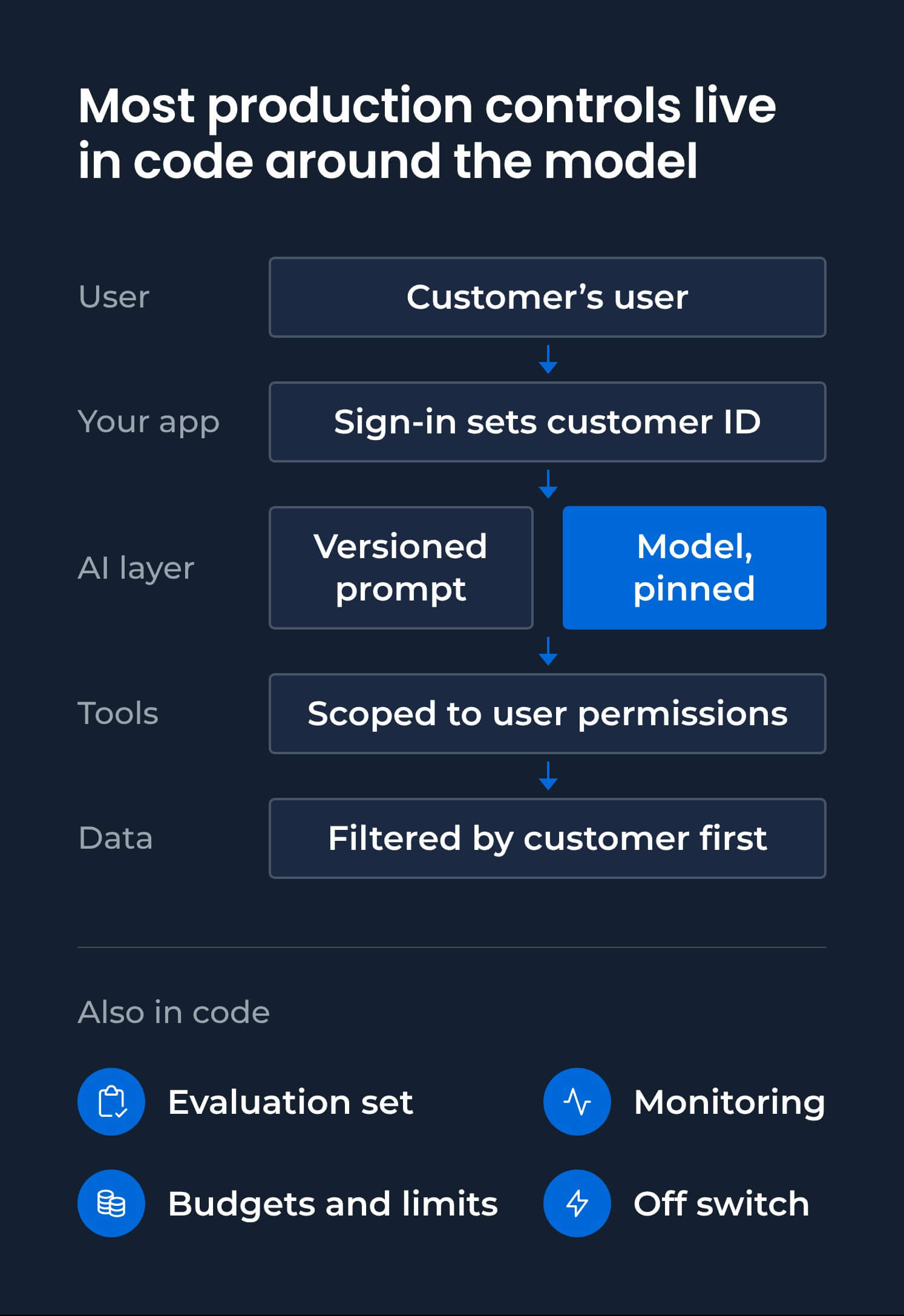
Give the AI No More Access Than Its User Has
Give every tool the AI can call its own credentials, scoped to the user and the task. When integrating AI into software you already run, you can often reuse the permission roles your product already has.
Scoped credentials: restrict each tool to actions the signed-in user is allowed to perform.
Read-only by default: start with read access and add write permissions only where needed. Read access still needs permission and tenant checks.
Protect destructive actions: require confirmation or delay irreversible operations, and keep backups beyond the reach of the AI's credentials.
Safe retries: give calls a timeout and use idempotency keys for writes, enforced by the receiving system, so retries don't repeat an action.
Test every tool as a low-privilege user, and confirm that unauthorized destructive calls fail, including ones made with the AI's own credentials.
In April 2026, an AI coding agent deleted PocketOS's production database and its backups, which were stored on the same volume. The token had been created for managing custom domains but was also authorized for destructive operations, The Register reported. The founder said the deletion took 9 seconds.
Enforce Rules in Code, and Ask a Person Only Where It Counts
Enforce rules about consent, refunds and data access in code, and use the prompt only to explain those rules to the model. Prompt injection happens when instructions hidden in content the model reads try to change its behavior. There's no complete fix: OpenAI has described the problem as "unlikely to ever be fully 'solved.'"
Simon Willison's "lethal trifecta" gives you a practical check: does the feature combine private data, untrusted content and a way to send data out? If it does, an attacker can trick it into handing over private data. Remove one of those conditions where possible, for example by preventing automatic loading of external links or images.
DBB's own AI chatbot enforces GDPR consent in code, so its lead-capture tool "cannot execute without explicit confirmation." A separate server-side gate "prevents premature lead capture even if the model is manipulated through prompt injection."
Human approval is useful for consequential actions, but repeated prompts can become routine. Anthropic found that Claude Code users accepted 93% of permission requests. Reserve human approval for actions the reviewer can meaningfully judge, and enforce the remaining rules in code.
Add red-team cases, inputs designed to make the model break a rule, to your evaluation set. Test that the rules still hold when the model is manipulated.
Keep Each Customer's Data Separate in Code
Keep each customer's data separate by taking the tenant identity from the authenticated request and filtering retrieval before the model sees the data. Microsoft warns that you can't count on the model to carry tenant or user context, even if it gets that right in tests.
Choose the level of isolation your customers need. A shared index with tenant filters may cost less, but AWS calls it "filter-level (logical) isolation" and warns that it doesn't replace hard tenant isolation in a multi-tenant SaaS product. Where a contract requires hard separation, use a separate store for each customer.
Add cross-customer probes to your evaluation set: requests that name another customer's people, IDs or documents. Confirm that every unauthorized request fails closed.
Test Latency and Cost Under Real Customer Usage
Measure response time and cost per successful request at the load you expect, including peak traffic. Set budgets and limits before launch, because a pilot with a handful of users won't show what happens under load.
Response time (p95): measure the 95th-percentile time to the first visible output and to the complete response. At p95, 95% of requests finish within that measured time or faster, while averages can hide slow responses. Test with production prompts and real tool calls, not short demo prompts. Our benchmark of 10 models for B2B chatbots shows how response times differ when tools are involved.
Cost per successful request: failed and retried calls are billed too. Divide the total cost of all attempts by the number that produced a usable result.
Session budgets: cap the steps, tokens and time an agent can use, so a looping request can't trigger unlimited model calls.
Provider rate limits: check your account's limits and whether they can handle a traffic increase. For example, Anthropic says new organizations may start in the Evaluation tier and advises customers to increase their traffic gradually.
Before launch, run a load test at expected peak traffic. The p95 response times and cost per successful request should stay within your budgets, and a deliberately looping request should stop at its configured limits.
Version Prompts and Pin Models, Then Re-Test Every Change
Treat every prompt, model and setting change as a release: version it, pin the model, and rerun the evaluation set before the change reaches customers.
In April 2026, Anthropic added a length limit to Claude Code's system prompt after weeks of internal testing found no regressions. A broader evaluation later showed a 3% drop for both Opus 4.6 and 4.7, so Anthropic reverted the change.
Version prompts and settings: review changes like code and record the active version with every request, so you can trace a bad answer to the configuration that produced it.
Pin model versions: call a specific model snapshot instead of an alias that can change. Google's "-latest" aliases, for example, are "hot-swapped" with each new release.
Gate changes with evaluations: rerun the full evaluation set, including cases that go beyond everyday use, and compare the results with the version currently serving customers before releasing the change.
Track retirement dates: providers retire even pinned models. Notice periods vary, from about 2 weeks for preview models to at least 60 days at Anthropic and at least 6 months for OpenAI's generally available models. Test the replacement as soon as a notice arrives.
How to Make AI Failures Visible and Reversible
Detect AI failures by monitoring the answers customers receive, alongside uptime. Give the feature a tested off switch, and decide who can use it and when.
Monitor What Customers Experience, Beyond Uptime
Trace requests and track empty or failed answers, refusals, cost per session, latency, fallback usage and user reports. These signals show problems that uptime monitoring alone can miss.
After DBB's own AI chatbot launched, its traces showed that 24.9% of answers were empty. Most came from questions about our content that exhausted the model's step budget. Increasing the step allowance and adding a recovery path fixed the problem.
Separate production traces revealed that a cross-vendor quality check on our Scope Documents had timed out on every run, so it had never applied a correction.
Put these signals on a dashboard and assign someone to respond to each alert.
Build the Off Switch Before Launch
Build an off switch that disables the AI without a deployment. Define when it should be used and who has authority to use it. DBB's own chatbot has a kill switch that disables chat without redeployment.
Test the switch before launch. Confirm that existing product workflows remain usable with AI disabled, and that AI-dependent tasks stop safely or hand off as intended.
Customer-Facing Requirements: AI Disclosure, Human Handoff and Support Readiness
Before customers rely on an AI feature, prepare 5 things: clear AI disclosure, a way to reach a person, answers grounded in your product's actual information, a support team that understands the feature and answers to customers' security questions.
In April 2025, Cursor's AI support agent invented a one-device-per-subscription policy. No such policy existed, and users hadn't been clearly told the agent was a bot. Cursor subsequently began labeling AI-generated email support replies.
AI disclosure: make it clear when people are interacting with AI in your interface, emails or calls. In the EU, Article 50 of the AI Act has applied since 2 August 2026 and requires disclosure for AI systems that interact directly with people unless that's already obvious. Whether you're the provider or deployer, and which obligations apply, needs legal review.
Human handoff: define when to involve a person, such as when a user asks, the AI can't resolve a request or the topic falls outside its scope. Pass the conversation to a staffed queue. From 1 January 2027, California's AB 1609 will require certain large businesses to make a good-faith effort to connect consumers with a representative within 15 minutes or schedule an appointment. If your customers use your AI to serve consumers, their handoff requirements may affect your product.
Answers you can stand behind: ground responses in your actual policies, prices and help center, and have the AI say when it doesn't know. In Moffatt v. Air Canada, a Canadian tribunal rejected the airline's suggestion that its chatbot was responsible for its own actions. "It should be obvious to Air Canada that it is responsible for all the information on its website," the tribunal wrote.
Support readiness: brief the support team on known failure modes, give them a way to identify AI-related tickets and establish a route to engineering when the problem needs a technical fix.
Customer security questions: prepare answers about data separation, who can disable the AI and which changes to models or sub-processors require notice. B2B customers will need these details for their own security reviews.
Before launch, verify that AI disclosure appears at the first interaction, a test handoff reaches a staffed queue with the conversation attached, and support knows the feature's documented failure modes.
AI Production Readiness: A Checklist for the Go/No-Go Decision
An AI feature is production-ready when every area has evidence a reviewer can check and a named owner has signed it.
A Readiness Checklist You Can Use in Your Review
The checklist pairs each verification step with the owner who usually signs it; adapt the owners to how your team works.
Area | What to verify | Owner |
|---|---|---|
Acceptance criteria | Written pass/fail criteria; 2 reviewers reach the same verdicts on a sample | Business owner |
Evaluation set | Cases from real inputs, a baseline score, a rerun on every change | Engineering lead |
Prototype decision | Each part kept, hardened or rebuilt on test results | Engineering lead |
Permissions | Every tool's access matches its user; unauthorized destructive calls fail | Engineering lead |
Business rules | Each rule holds when the model is told to break it | Security lead |
Customer data | Cross-customer probes fail closed | Security lead |
Latency and cost | p95 response time and cost per successful request within budget at expected peak | Product owner |
Change control | Prompts and settings versioned, model pinned, a full rerun before any change ships | Engineering lead |
Monitoring | Quality signals on a dashboard, each alert with an owner | Engineering lead |
Off switch | Tested; existing workflows remain available and AI-dependent tasks stop safely or hand off | Engineering lead |
Customers | AI disclosed where required, handoff tested, support briefed | Product owner |
Readiness covers one version of the system. A new model, prompt or tool set needs another check.
Who Makes the Go/No-Go Call
Different owners sign off on different parts of the review: the business owner approves the acceptance criteria, engineering signs the technical evidence, security signs data access and permissions, and product and support confirm customer readiness. One named person must also have authority to pause the feature after launch. Resuming it is a separate decision, supported by evidence that the issue has been addressed.
Metrics alone shouldn't decide the launch. In OpenAI's review of its April 2025 GPT-4o update, offline evaluations and A/B tests were positive, but some expert testers felt the model's behavior was off. OpenAI launched the update anyway, rolled it back within days and later called the launch decision "the wrong call." Give a named reviewer authority to block a launch over qualitative concerns, even when the metrics look good.
If you're the founder signing off, ask your team 3 questions: what would make us pause this feature, who has the authority to switch it off, and what will customers see when we do?
A go decision starts a staged rollout: release to a small group of customers first, set a written rule for expanding or rolling back, and continue evaluating after launch. Our guide to rolling out an AI feature to paying customers covers that phase.
Example: Taking AI Hotel Search to Production for Travel Agencies
On a travel platform with AI hotel search, agencies connect their hotel inventory, and travelers search by describing the trip they want. As AI search became the platform's main feature, DBB worked on the production side of AI product development: evaluating search quality, comparing pipeline versions and building the customer-facing features agencies needed.
Evaluation sets based on realistic traveler requests help the team score changes before release. An orchestration layer runs different versions of the search pipeline side by side, so engineers can compare a proposed change with the version already serving users. The pipeline uses mainly open-weight models across several inference providers to manage query costs, and each agency gets billing, usage and statistics for its own account.
The team used those evaluations to correct wrong results found at launch. One agency replaced its own website with the platform, where the AI search now runs in production.
Moving Your AI Pilot to Production: Where to Start
Start with the readiness checklist. For each requirement your pilot doesn't meet, identify the missing evidence, assign an owner and decide whether it blocks launch. Those gaps become your plan for getting the feature ready for customers.
If you need help deciding what to fix first, book a 30-minute call with our engineers. We'll help identify which parts of your prototype may be worth keeping, hardening or rebuilding.
FAQ


Content Marketing Manager, Researcher
Most Popular