
AI Chatbot Development: Benefits, Key Features, and How to Build One
Product development
AI
MVP
Updated: September 25, 2026 | Published: March 31, 2026
Key Takeaways
Custom AI chatbot development cuts support costs by up to 30%
The global chatbot market reached $9.56 billion in 2025 and is projected to hit $41.2 billion by 2033. Businesses that don't automate customer engagement now will fall behind
Custom chatbots cost significantly less than SaaS in the long term. One real project runs at $25/month vs $1,200-$5,000/month for enterprise SaaS platforms
Self-hosted chatbots give you full data control, deeper system integration, and compliance-ready security for GDPR, HIPAA, and SOC 2
A custom AI chatbot can be built in as few as 4 weeks with the right architecture, tech stack, and custom AI chatbot development team
Introduction
Your competitors are automating customer engagement with AI chatbots. Meanwhile, your team is manually handling the same questions, qualifying leads by hand, and losing customers to slow response times after hours.
Every unanswered query is a lost lead. Every generic SaaS chatbot response that can't access your internal systems is a missed opportunity. In e-commerce alone, businesses using AI chatbots see a 12.3% conversion rate vs 3.1% without, a 4x lift. Those that don't invest in AI chatbot development are leaving revenue on the table.
The good news? Building a custom AI chatbot isn't the year-long, million-dollar project it used to be. LLM API prices dropped roughly 80% from 2025 to 2026, open protocols like MCP make integrations easier, and modern frameworks let small teams ship production-ready chatbots in weeks, not months.
At DBB Software, we built and deployed our own AI chatbot in 4 weeks with a single developer. In this guide, we'll share the exact process, tech stack, and lessons learned so you can make informed decisions about your own chatbot development project.
This article is for CTOs evaluating build vs buy, product managers scoping chatbot projects, and CEOs assessing the ROI of conversational AI.
What Is Custom AI Chatbot Development, and Why Go Custom?
Custom chatbot development is the process of building a conversational AI assistant tailored to your business: your data, your workflows, your systems. Unlike off-the-shelf SaaS chatbots that scrape your public pages and offer template-based responses, a custom-built chatbot connects directly to your CMS, CRM, databases, and internal tools through APIs.
The result? A chatbot that doesn't just answer generic questions. It pulls real-time inventory data, qualifies leads using your sales criteria, books meetings on your calendar, and escalates to the right human agent when needed.
Here's how custom stacks up against SaaS:
Factor | SaaS | Custom-Built |
|---|---|---|
Setup time | Hours–days | 4-12 weeks |
Monthly cost (enterprise) | $1,200-$5,000 | $400-$1,500 (ops only) |
Data integration | Page scraping, limited APIs | Direct API/MCP, real-time |
Data ownership | Vendor-hosted | Self-hosted, full control |
Customization | Template-based | Unlimited |
Security | Vendor-dependent | Your infrastructure |
Scalability | Per-seat/conversation pricing | Pay-per-use LLM API |
Vendor lock-in | High | None (provider-agnostic) |
The distinction matters most as you scale. SaaS chatbots charge per conversation or per seat, and costs balloon as usage grows. Custom chatbots run on pay-per-use LLM APIs where prices are dropping year over year. At 1,000 conversations per month, a SaaS platform might cost $1,200+. DBB Software's own AI chatbot handles the same volume for $25/month because it uses Gemini Flash via a provider-agnostic API gateway and connects to 16 real-time CMS tools through the MCP protocol, with zero manual content maintenance.
If you're weighing the broader question of no-code vs custom development, the same logic applies: off-the-shelf tools work for simple use cases, but custom gives you control, performance, and long-term cost efficiency.
Why Build a Custom AI Chatbot? Benefits by Role
The benefits of AI chatbot development depend on who you ask. Here's what each stakeholder gets from a custom-built chatbot.
For CTOs and CIOs: Technical Flexibility and Future-Proofing
Provider-agnostic architecture — you're not locked into one LLM vendor. DBB's chatbot switches between AI providers with a single environment variable, using Vercel AI Gateway. If a better or cheaper model launches next quarter, you swap with no code changes.
MCP interoperability — the Model Context Protocol has hit 97 million monthly SDK downloads and is now adopted by OpenAI, Google, Anthropic, Microsoft, and Amazon. Building on MCP means your chatbot's integrations follow an open standard, not a proprietary lock-in.
Tool-augmented generation — instead of relying on traditional RAG (which searches for the "closest" content match), your chatbot decides which tools to call and fetches exact data in real time. More on this in the Features section.
Linear cost scaling — LLM API pricing scales with usage, not in seat-based or tier-based jumps. Per-session token budgets (via tools like Upstash Redis) prevent cost runaway, and prompt caching cuts up to 90% on repeated context. If you hit rate limits, a provider-agnostic gateway lets you route to fallback models without re-architecture.
For Operations Managers: Less Manual Work, Better Data
Zero-maintenance content sync — a custom chatbot pulls directly from your CMS or knowledge base via API. When you update a page, the chatbot knows immediately. No manual retraining, no stale FAQ lists.
Structured lead data — instead of raw chat transcripts, you get validated fields: budget, authority, need, timeline (BANT). Our chatbot delivers pre-qualified lead data directly to Slack. No parsing, no guesswork.
24/7 availability — consistent responses at 3 AM on a Saturday. Customers already expect instant responses, and businesses that don't offer them lose to those that do.
For CEOs and CFOs: ROI That Compounds Over Time
Up to 30% reduction in support costs — chatbots handle routine queries so your team focuses on complex, high-value interactions.
40x cost advantage at scale — DBB's chatbot runs at $25/month vs $1,200–$5,000/month for enterprise SaaS. At $0.015 per conversation, it's a fraction of the $1-$6 per resolution that SaaS platforms charge.
No per-seat or per-conversation pricing — your costs don't spike when usage does.
The numbers vary by industry, but the trend is clear:
E-commerce: 12.3% conversion rate with chatbot assistance vs 3.1% without. Businesses that have integrated AI in eCommerce are capturing 4x more conversions
Banking: $0.50–$0.70 saved per interaction, with chatbots projected to deliver $7.3 billion in cost savings for the banking sector globally.
Healthcare: The healthcare chatbot market is projected to reach $543.65 million by 2026, driven by patient triage, appointment booking, and symptom checking.
Must-Have Features for a Custom AI Chatbot
Not every chatbot needs every feature. But if you're investing in custom chatbot development, these are the capabilities that separate a useful tool from a glorified FAQ page.
1. Natural Language Processing (NLP)
An NLP chatbot understands intent, not just keywords. It handles typos, slang, incomplete sentences, and context shifts, so users don't need to phrase their questions perfectly. Modern LLMs like GPT, Claude, and Gemini handle this natively, but fine-tuning for your domain (industry terms, product names, internal jargon) is what makes the difference between a chatbot that "kind of works" and one that feels genuinely helpful.
2. Multilingual Support
Serve global audiences without building separate bots per language. Most LLMs support dozens of languages out of the box. The key is testing response quality in your target languages, not just assuming translation accuracy.
3. Human Handoff
100% automation isn't the goal. Users who can't reach a human will leave. Build seamless escalation triggers: when the chatbot detects frustration, hits confidence thresholds, or encounters topics outside its scope, it should hand off to a live agent with full conversation context.
That means: the agent receives the complete transcript, a chatbot-generated summary of the issue, and any collected customer data, so they never ask the user to repeat themselves. The best handoffs are invisible: the user sees a seamless transition, and the agent greeting acknowledges context ("I see you were asking about...").
4. Analytics and Observability
You can't improve what you don't measure. Track resolution rate, customer satisfaction (CSAT), fallback rate, average response time, and cost per conversation. DBB's chatbot uses Langfuse for conversation observability, where every interaction is logged, searchable, and tied to cost metrics.
5. Lead Qualification
This is where chatbots shift from a support cost center to a revenue driver. Instead of raw chat transcripts, structure the conversation to collect validated data: budget, authority, need, timeline (BANT). DBB's chatbot uses Zod-validated fields to ensure lead data is structured and complete, then delivers pre-qualified leads directly to Slack. No manual parsing, no missed opportunities.
6. Agentic Capabilities (MCP and Tool Calling)
This is the 2026 frontier. Static chatbots answer questions. Agentic chatbots perform actions: they navigate your site, pull case studies, check service pages, query your CRM, and book meetings. The Model Context Protocol (MCP) standardizes how AI connects to external tools. With over 12,700 MCP servers available in public registries and adoption from every major AI provider, it's becoming the default for agentic AI.
DBB's chatbot uses 12 MCP tools to pull real-time data from Storyblok CMS (service pages, case studies, team info, blog posts) without embeddings and without a vector database.
How It Works Under the Hood: Tool-Augmented Generation vs RAG
Most chatbot guides talk about RAG (Retrieval-Augmented Generation), the approach where you convert your content into embeddings, store them in a vector database, and search for the "closest" match when a user asks a question.
RAG works, but it has a limitation: it returns the most similar content, not necessarily the most accurate answer. If your knowledge base has overlapping topics, RAG can retrieve irrelevant chunks.
Tool-augmented generation takes a different approach. Instead of searching embeddings, the LLM decides which tools or APIs to call based on the user's question, then fetches exact data in real time. Think of it as giving the chatbot a toolkit instead of a library.
Our chatbot uses this approach: when a user asks about DBB's services, the LLM picks from 12 MCP tools to call the right Storyblok API endpoint and returns precise, up-to-date information. No embeddings, no vector DB, no stale content.
How to Build a Custom AI Chatbot: Step-by-Step Process
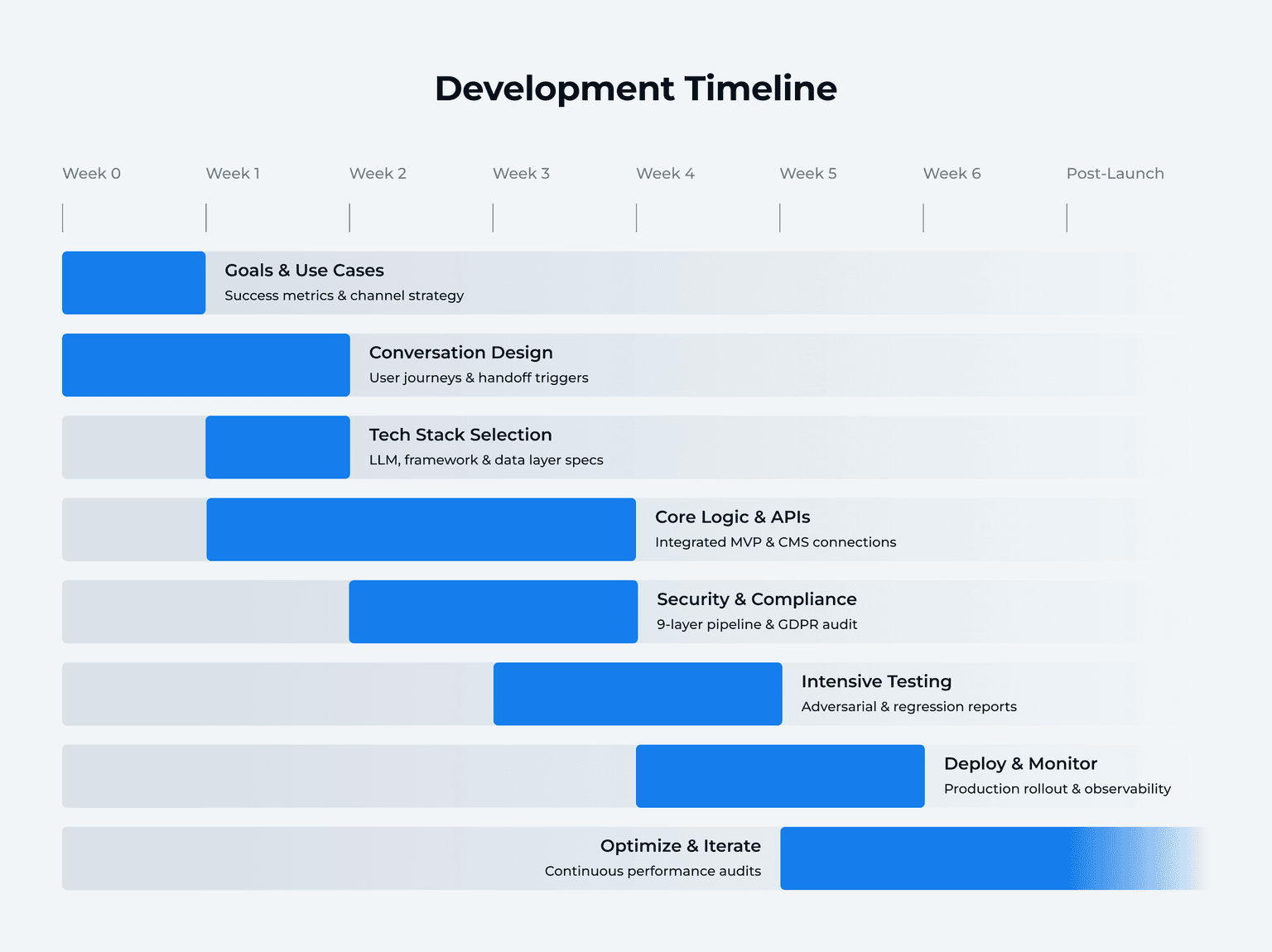
Here's the development process we recommend, based on building our own AI chatbot and working with clients on conversational AI projects. Timeline assumes a focused MVP with a small team.
Step 1: Define Goals and Use Cases (Week 1)
Start with the business problem, not the technology. What should the chatbot solve? Customer support? Lead qualification? Internal knowledge access? Onboarding?
Define your channels (web widget, WhatsApp, Slack), your target audience, and your success metrics upfront. Resolution rate, CSAT, and cost per conversation are the three metrics that matter most.
CTO lens: What systems does it need to integrate with? What data does it need access to?
CFO lens: What's the budget ceiling? What's the expected ROI timeline?
Step 2: Conversation Design (Week 1-2)
This step is skipped more than any other, and it's the one that determines whether users actually like your chatbot. Map user journeys, define conversation flows, set the chatbot's personality and tone, and plan fallback responses.
Decide when the chatbot should escalate to a human. Define escalation triggers: low-confidence responses, user frustration signals, sensitive topics, or explicit "talk to a human" requests.
Start simple and evolve. The best chatbots go through iterative phases, beginning with basic Q&A and gradually adding agentic capabilities. Design the conversation flows for v1, not the final vision.
Step 3: Choose Your Tech Stack (Week 2)
Your tech stack choices depend on your use case, budget, and team. Key decisions:
LLM provider — GPT, Claude, Gemini, or open-source (Llama, DeepSeek). See the Tech Stack section below for a comparison.
Framework — Vercel AI SDK, LangChain, Rasa, or custom. Each has trade-offs between flexibility and complexity.
Data layer — RAG (vector DB + embeddings) or tool-augmented generation (MCP/API calls). Choose based on your content structure.
Hosting — Cloud vs on-prem. On-prem adds complexity but may be required for HIPAA or SOC 2 compliance.
Step 4: Build Core Bot Logic (Week 2-4)
This is where the actual development happens. Build intent recognition and response generation, integrate with your systems (CRM, CMS, calendar, payment), implement lead qualification workflows, and handle multi-turn conversation context.
If you're building an MVP, focus on 1–2 core use cases first. Don't try to solve everything in v1.
Step 5: Security and Compliance (Week 3-4)
Implement authentication, rate limiting, input validation, and encryption from the start, not as an afterthought. For regulated industries (healthcare, finance), add GDPR consent flows, HIPAA-compliant data handling, and audit trails. This step alone adds 30–50% to the timeline in regulated environments. More details in the Security section below.
Step 6: Testing (Week 4-5)
Chatbot testing goes beyond standard unit and integration tests. Focus on these chatbot-specific test categories:
Conversation flow regression — verify multi-turn dialogues, topic transitions, and context retention work correctly after every code change
Adversarial/prompt injection testing — systematically test for jailbreaks, PII extraction attempts, and instruction override attacks. Automate these, as manual testing misses edge cases
Hallucination spot-checks — validate factual accuracy against your knowledge base. If the chatbot cites a price, policy, or feature, verify it matches the source data
Role adherence — confirm the chatbot stays within its defined scope and persona. What happens when a user asks about competitors? Requests medical advice? Goes completely off-topic?
Full test suite coverage isn't always necessary for an MVP, but testing your security pipeline and conversation boundaries is non-negotiable.
Step 7: Deploy and Monitor (Week 5-6)
Don't launch to everyone on day one. Roll out in stages: internal team → beta users → production. Set up observability from the start. You need to see every conversation, measure cost per interaction, and catch issues before users report them. Tools like Langfuse, LangSmith, or Arize AI let you log every session with cost tracking, so you know exactly what each conversation costs and where the chatbot struggles.
Step 8: Optimize and Iterate (Ongoing)
Chatbot development doesn't end at launch. Here's a practical cadence that high-performing teams follow:
Weekly: Review resolution rate, fallback rate, CSAT, and cost per conversation. Flag conversations where the chatbot failed or fell back to generic responses.
Monthly: Deep-dive into conversation logs. Identify new question patterns, update your knowledge base, and A/B test response strategies. This is where most improvement happens.
Quarterly: Audit knowledge base accuracy, review security logs, and assess whether the chatbot's scope should expand or narrow based on usage data.
Ownership typically falls to a product manager or support lead, not necessarily an engineer. The key is that someone is watching the data consistently and translating conversation insights into actionable updates.
How to Choose the Right Tech Stack for Your AI Chatbot
Your tech stack shapes everything: performance, cost, scalability, and how fast you can iterate. Here's how to make the right choices.
Frameworks and Platforms
Framework | Best For | Strengths | Limitations |
|---|---|---|---|
Dialogflow (Google) | Voice + text bots | Google ecosystem, multilingual, managed | Limited customization at scale |
Rasa | On-prem, full control | Open-source, data privacy, extensible | Steep learning curve, self-hosted |
Vercel AI SDK | Modern web apps | Streaming, multi-provider, TypeScript | Web-focused, newer ecosystem |
LangChain | RAG-heavy apps | Flexible, large community, Python | Abstraction overhead, complexity |
Microsoft Bot Framework | Enterprise/Teams | Azure ecosystem, enterprise auth | Microsoft lock-in |
LLM Selection: What Actually Matters
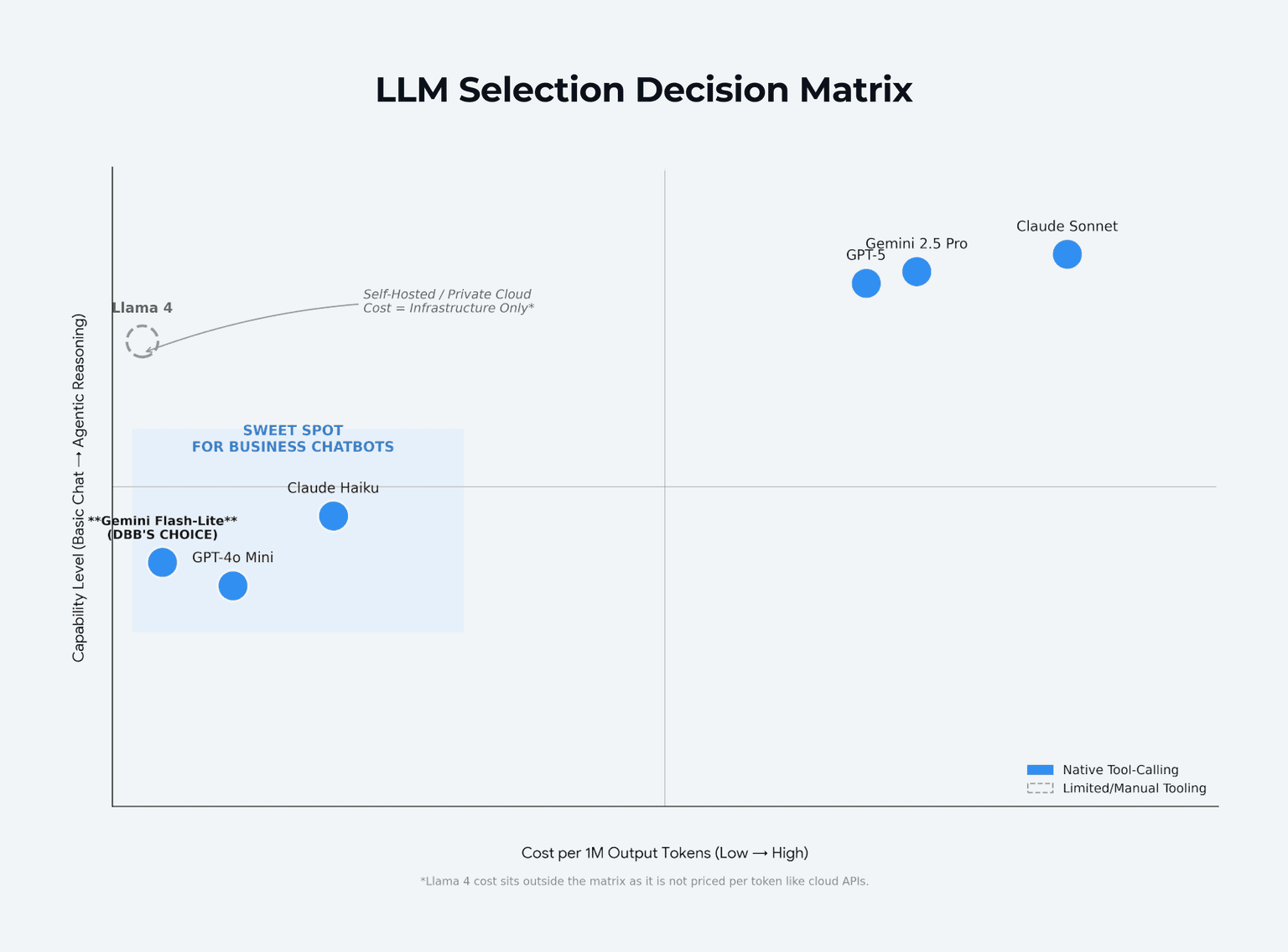
Don't default to the most hyped model. Evaluate based on your specific use case:
Criteria | What to Evaluate |
|---|---|
Cost per token | Budget vs quality trade-off; see pricing table below |
Latency | Sub-second response times are critical for chat UX |
Context window | How much conversation history can the model maintain? |
Tool-calling support | Native support is critical for agentic bots. Prompt-based workarounds are fragile |
Data privacy | Cloud API vs self-hosted (Llama, DeepSeek) for regulated industries |
LLM Pricing Comparison (per 1M tokens, March 2026)
Model | Input | Output | Tool Calling | Best For |
|---|---|---|---|---|
Gemini Flash-Lite | $0.08 | $0.30 | Native | Budget chatbots, high volume |
GPT-4o Mini | $0.15 | $0.60 | Native | Best value for general use |
Claude Haiku | $0.25 | $1.25 | Native | Fast responses, affordable |
GPT-5 | $1.25 | $10.00 | Native | Complex reasoning |
Gemini 2.5 Pro | $1.25 | $10.00 | Native + grounding | Technical accuracy |
Claude Sonnet | $3.00 | $15.00 | Native | Quality + nuanced responses |
Llama 4 (self-hosted) | Infrastructure cost | Infrastructure cost | Limited | Maximum data privacy |
Key trend: LLM API prices dropped roughly 80% from 2025 to 2026. Prompt caching saves up to 90% on repeated context. Batch APIs offer 50% off for async tasks. The cost barrier to AI chatbot development is lower than it's ever been.
Case Example: DBB's AI Chatbot Tech Stack
Here's what powers DBB Software's own chatbot:
LLM: Gemini Flash via Vercel AI Gateway — chosen for speed and cost ($0.015 per conversation). Provider-agnostic: switch to any LLM with one environment variable.
Framework: Vercel AI SDK — streaming responses, multi-provider support, TypeScript-native
Content layer: Storyblok CMS + 12 MCP tools — real-time content access, no embeddings or vector DB
Rate limiting: Upstash Redis — per-session token budgets and abuse prevention
Observability: Langfuse — conversation analytics, cost tracking per session
Security: A layered validation pipeline (detailed in the Security section)
This stack was chosen for portability, cost control, and speed. The entire chatbot was built in 4 weeks by 1 developer using Claude Code.
5 AI Chatbot Development Mistakes That Cost Time and Money
Now that you know the steps and the tools, here's what goes wrong.
1. Choosing Tools Before Defining the Use Case
Teams get excited about GPT-5 or the latest framework and start building before answering basic questions: What problem does the chatbot solve? Who's using it? What does success look like? A $150,000 enterprise build for a simple FAQ bot is a wasted budget. Start with the problem. The tech stack follows.
2. Skipping Conversation Design
Jumping straight to code produces a technically impressive bot that nobody wants to talk to. The chatbot might have perfect NLP, but if the conversation flow is confusing, users bail. Map user journeys and test conversation scripts before you write a single line of code.
3. No Human Escalation Path
Users who can't reach a human will leave, and they'll remember. 80% of consumers are happy to use a chatbot if they can switch to a human agent when needed. Build escalation triggers from day one: low-confidence responses, user frustration signals, and explicit "talk to a human" requests.
4. Over-Engineering v1
Ship a focused MVP. Measure. Iterate. DBB's chatbot started with basic Q&A in Phase 1 and evolved through 9 phases to reach agentic MCP capabilities. If you try to build the final version first, you'll spend months building features nobody asked for. Building an MVP applies to chatbots just as much as any other product.
5. Ignoring Post-Launch Optimization
Chatbots aren't "set and forget." Without regular conversation review, response quality degrades, user needs evolve, and your chatbot falls behind. Track resolution rate, fallback rate, and CSAT weekly. Review conversation logs monthly. Update your knowledge base and retrain as your product or services change.
How Much Does Custom AI Chatbot Development Cost in 2026?
Chatbot development cost varies widely based on complexity, integrations, and compliance requirements. Here's what to expect.
Cost by Complexity Tier
Tier | Development Cost | Monthly Ops | What You Get |
|---|---|---|---|
Basic (rule-based) | $5,000-$30,000 | $400-$800 | FAQ handling, order tracking, simple conversation flows |
Mid-tier (AI/NLP) | $30,000-$150,000 | $800-$1,500 | NLP understanding, CRM integration, multi-channel support |
Enterprise | $150,000-$500,000+ | $1,500+ | Compliance (HIPAA, SOC 2), biometric auth, complex automation |
What Drives the Cost Up
NLP complexity: A well-tuned NLP layer alone costs $20,000-$80,000 depending on domain specificity and language support
Integrations: Each API connection (CRM, payment gateway, ERP) adds $5,000-$25,000
Security and compliance: Regulated industries (healthcare, finance) see costs increase by 30-50% for encryption, audit trails, and certification
Developer location: $150-$300/hour in North America vs $25-$80/hour in Eastern Europe or Asia
Looking for ways to manage your budget? These strategies for reducing software development costs apply directly to chatbot projects. And if you're unsure about overall MVP budgeting, check how much it costs to build an MVP.
The SaaS Cost Trap
SaaS chatbots look affordable at first glance: $50-$500/month for SMBs, and even enterprise plans start at around $1,200/month. But pricing is per-seat or per-conversation. As your volume grows, costs balloon.
At 1,000 conversations per month on an enterprise SaaS plan, you're paying $1,200-$5,000/month. That's $14,400-$60,000 per year for a chatbot you don't own, can't deeply customize, and can't migrate without starting over.
A custom chatbot with pay-per-use LLM APIs costs a fraction of that, and the economics improve over time as API prices continue to drop.
Real-World Comparison: DBB's AI Chatbot
Metric | Enterprise SaaS | DBB's Chatbot |
|---|---|---|
Monthly cost (1K conversations) | $1,200-$5,000 | $25 |
Cost per conversation | $1-$6 | $0.015 |
Annual cost | $14,400-$60,000 | $300 |
Data ownership | Vendor | You |
Vendor lock-in | Yes | No |
The difference is 40x, not because custom chatbots are always this cheap, but because a well-architected system with the right LLM (Gemini Flash) and efficient token management makes this possible.
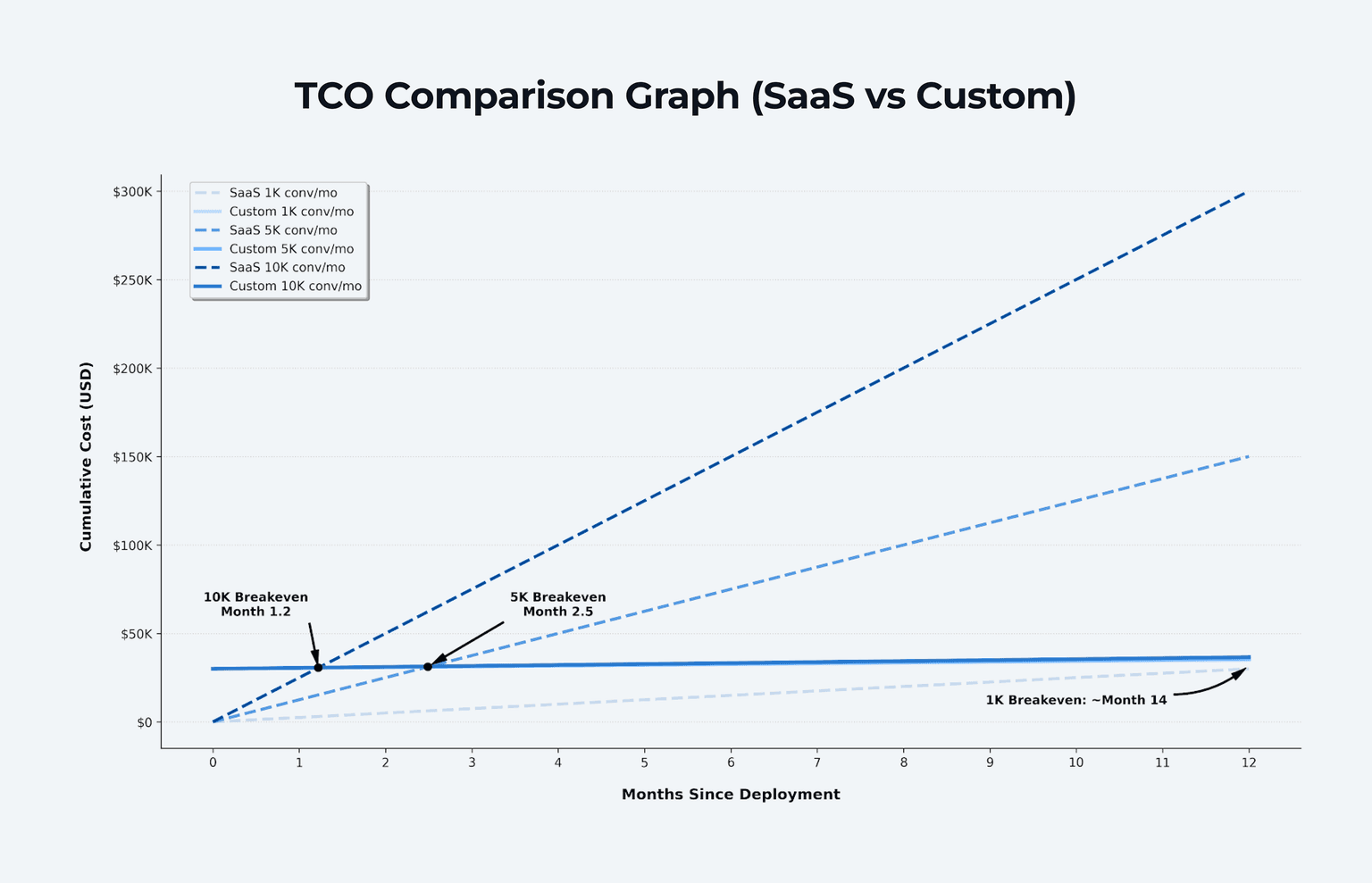
When Does Custom Break Even?
The 40x operating cost advantage doesn't tell the full story. You need to factor in upfront development investment. Here's the breakeven math at different build costs:
Build Cost | Monthly Ops | SaaS Equivalent | Breakeven |
|---|---|---|---|
$30,000 (basic) | $25-$400 | $1,200/month | ~2-3 years |
$80,000 (mid-tier) | $25-$800 | $2,500/month | ~3-4 years |
$150,000 (enterprise) | $25-$1,500 | $5,000/month | ~3-4 years |
After breakeven, the savings compound, and unlike SaaS, your per-conversation costs don't spike as volume grows. LLM API pricing scales linearly, not in tiers.
The higher your conversation volume, the faster you break even. As volume grows, per-resolution SaaS pricing becomes prohibitively expensive, making custom builds the financially compelling choice.
What to Plan For
Custom chatbots come with risks, but each has a built-in mitigation:
LLM provider dependency — mitigated by provider-agnostic architecture. If your gateway supports multiple models, a vendor's pricing change or API deprecation is a config swap, not a rebuild. Abstraction layers that normalize inputs/outputs across providers are the standard approach.
Hallucination — mitigated by tool-augmented generation. Because the chatbot fetches exact data via API calls rather than generating from training knowledge, hallucination risk drops significantly. For high-stakes responses, add confidence thresholds and human-in-the-loop review.
Key-person dependency — mitigated by standard frameworks (Vercel AI SDK, MCP) and documentation. If your chatbot is built on open standards, any competent developer can maintain it.
API pricing changes — mitigated by prompt caching (90% savings on repeated context), batch APIs (50% off for async), and the ability to switch to cheaper models as they launch.
Build a Smarter Chatbot Without the Enterprise Price Tag
DBB Software's chatbot development services combine AI expertise with a proven development framework.
Talk to our team
How to Keep Your AI Chatbot Secure and Compliant
Security is the section most competitor guides skip, and it's the one that matters most for enterprise buyers. If your chatbot handles customer data, lead information, or operates in a regulated industry, this isn't optional.
GDPR Requirements
If you serve EU users, your chatbot must comply with GDPR from the design stage:
Explicit consent — inform users they're interacting with AI and get consent before collecting personal data. Not a buried checkbox, but a clear, schema-level enforcement
Data minimization — collect only what's necessary for the conversation. Don't log everything "just in case"
Right to deletion — users can request their data be removed. Your system needs to support this at the data layer
Data Protection Impact Assessment (DPIA) — required for chatbots processing sensitive data at scale
Penalties: Up to EUR 20 million or 4% of worldwide annual turnover, whichever is higher
HIPAA Considerations (Healthcare)
For chatbots in healthcare, add:
End-to-end encryption (AES-256 for data at rest and in transit)
Role-based access controls and audit trails
Business Associate Agreements with all third-party services
This alone adds 30-50% to development cost, so budget for it upfront
The EU AI Act Factor
The EU AI Act now intersects with GDPR. AI systems are classified by risk level, and chatbots handling sensitive personal data may face additional requirements. Continuous regulatory monitoring isn't optional. It's part of your operational cost.
Case Example: DBB's Layered Security Stack
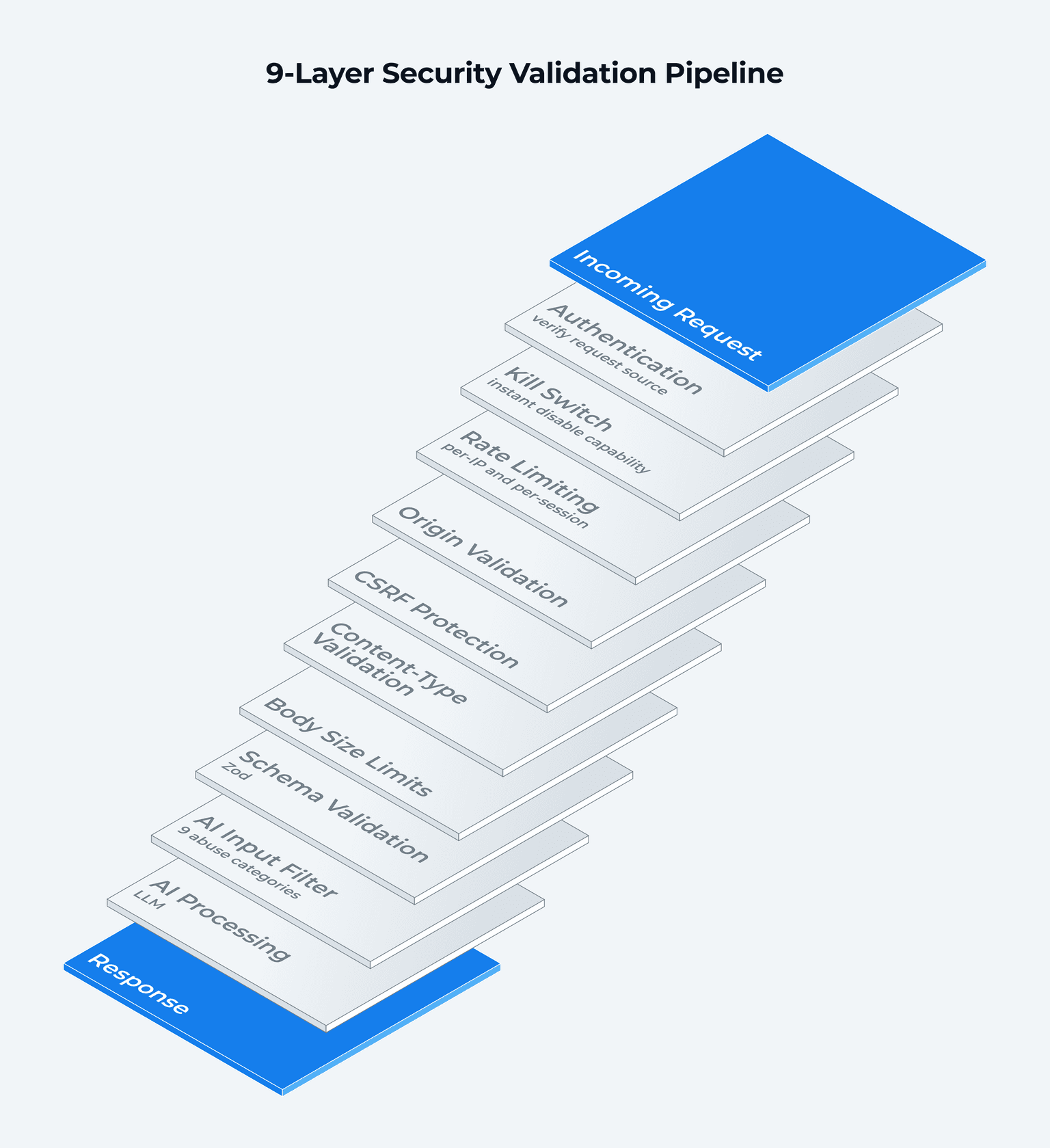
A production chatbot needs multiple layers of defense: authentication, rate limiting, input validation, CSRF protection, and AI-specific filtering at minimum. Here's how DBB implements this as a layered validation pipeline:
Basic authentication
Kill switch (instant disable if needed)
Rate limiting (per-IP and per-session)
Origin validation
CSRF protection
Content-type validation
Body size limits
Schema validation (Zod)
AI input filter (9 abuse categories)
The AI input filter alone covers 9 abuse categories, including prompt injection, PII extraction attempts, hate speech, jailbreak prompts, and off-topic manipulation, aligned with the OWASP Top 10 for LLM Applications, the industry-standard risk classification for AI systems.
On top of this: schema-level GDPR consent enforcement (not UI-level, enforced at the data layer), a 3-message server-side minimum before consent collection, and more than 3,000 unit tests covering every security layer.
The takeaway? Security isn't a feature you add at the end. It's an architecture decision you make at the start.
How DBB Software Can Help with Custom AI Chatbot Development
We didn't just write about custom AI chatbots. We built one.
Our AI chatbot is live on dbbsoftware.com, available for you to interact with right now. It was built in 4 weeks by a single developer using AI-assisted development, and it demonstrates everything this guide covers:
40x cost advantage — $25/month vs $1,200-$5,000/month for enterprise SaaS
Layered security pipeline — from basic auth to AI input filtering, with more than 3,000 unit tests
12 MCP tools — real-time CMS integration with zero manual maintenance
Provider-agnostic architecture — switch LLM providers with a single environment variable
Structured lead qualification — BANT data validated and delivered to Slack automatically
We bring this same approach to client projects, whether you need an MVP chatbot scoped in weeks or an enterprise-grade conversational AI platform. Our chatbot development services and AI development expertise cover the full stack: strategy, architecture, development, security, and post-launch optimization.
Want to see what a custom chatbot can do for your business? Try our AI chatbot or book a free consultation with our team.
Conclusion
AI chatbot development is no longer a luxury reserved for enterprises with six-figure budgets. LLM API costs have dropped 80% in a year. Open standards like MCP make integrations portable. Modern frameworks let small teams build production-ready chatbots in weeks.
Here's what matters:
Custom chatbots cut support costs by up to 30%
The long-term cost advantage over SaaS is significant, and it grows as your conversation volume increases
Security and compliance aren't afterthoughts. They're architecture decisions that shape every other choice
The right tech stack (provider-agnostic, tool-augmented, observable) gives you flexibility to evolve without rebuilding
The question isn't whether your business needs an AI chatbot. It's whether you'll build one that truly fits your systems, your data, and your customers, or settle for a template that can't.
Ready to start? Whether you need strategy, architecture, or end-to-end chatbot development services, book a free consultation with DBB Software. We'll scope your project, share what we learned building our own AI chatbot, and help you find the fastest path to a chatbot that delivers real results.
FAQ



Co-Founder of DBB Software
Most Popular