
No Code/Low Code vs Pre-Built Solutions vs Custom Development: What’s Best for Your Product?
Product development
Pre-built solutions
MVP
Startups
Updated: May 7, 2026 | Published: September 9, 2025
Imagine launching your app in days, without writing a single line of code, and seeing your idea hit the market. In 2025, 62% of new apps rely on no-code development or low-code development—a shift that’s made software development accessible to nontechnical founders like you. These development platforms let you build fast and test ideas without a big budget.
But speed isn’t enough. You need a custom app that grows with your vision, not one stuck in a platform’s limits. So, how do you choose between no-code and low-code platforms, pre-built components, or custom development?
No-code and low-code platforms can deliver a 253% ROI in just seven months, but scalability (47%), vendor lock-in (37%), and security gaps (25%) often hold them back. That’s why many startups pivot to pre-built components or custom software development for lasting control and growth.
This article breaks down no-code vs low-code vs pre-built vs custom development. You’ll learn when to use no-code tools, when to leverage pre-built components like DBB Software’s modules, and when to invest in custom development for a standout product.
By the end, you’ll have a clear path to launch your custom app quickly, scale smart, and future-proof your success with the right development approach.
Decode Your Options: No-Code, Low-Code, Pre-Built, or Custom
You’re ready to bring your product to life, but which path gets you there fastest—and furthest? In 2025, the software development landscape offers four paths: no-code development, low-code development, pre-built components, or custom development. Each suits different needs, from quick launches to long-term growth. Let’s unpack them so you can choose the best development approach for your startup.
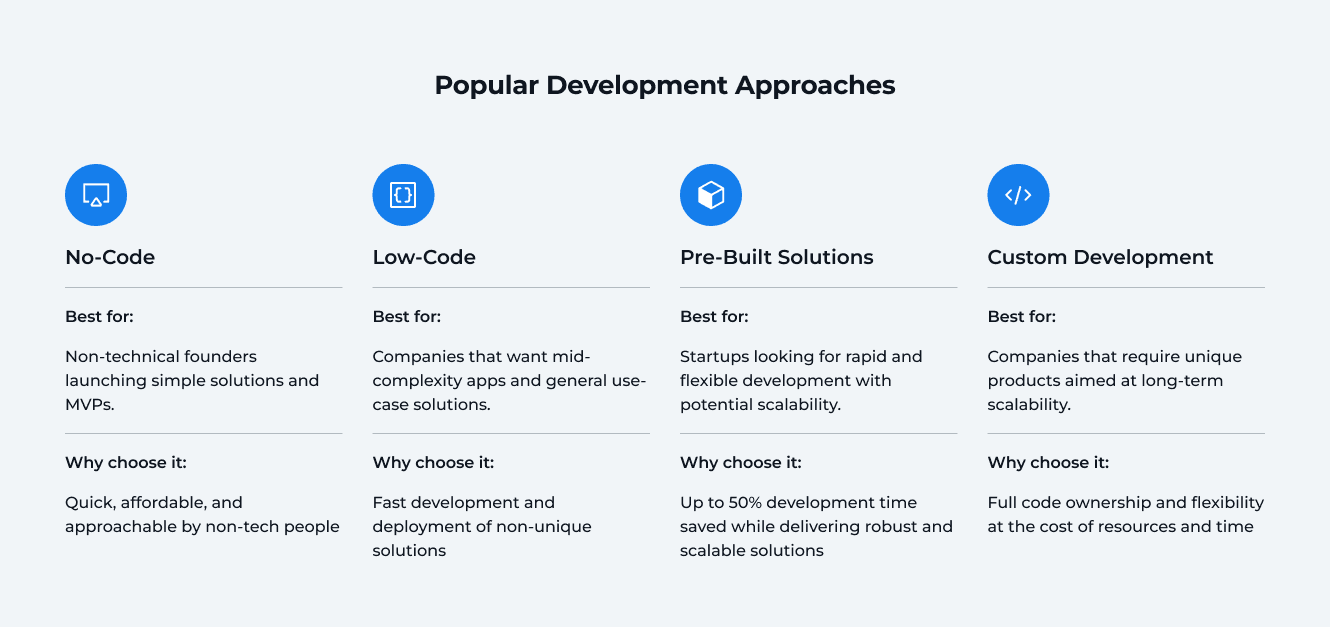
No-Code Development:
Use no-code platforms like Bubble (web apps), Wix (websites), or Glide (mobile apps) to create apps with visual, drag-and-drop tools—no coding required.
Best for: Non-technical founders launching a Minimum Viable Product (MVP) to test ideas fast.
Why choose it: No-code development is quick, affordable, and lets you validate demand without writing a single line of code..
Low-Code Development:
Low-code platforms, such as OutSystems or Retool, combine visual tools with minimal coding for faster app development, offering some flexibility.
Best for: Internal dashboards or mid-complexity apps needing minor tweaks.
Why choose it: Speeds up the development process compared to traditional development, with room for developers to tweak.
Pre-Built Solutions:
Ready-to-use modules offer proven features you can plug in fast.
Best for: Startups seeking fast, reliable app development with scalability.
Why choose it: Saves up to 50% of development time while ensuring robust, scalable code solutions.
Custom Development:
Fully tailored code, like Netflix’s recommendation engine or Uber’s dispatch system, built for your exact needs.
Best for: Unique products needing long-term scalability and custom app development.
Why choose it: Offers full ownership and flexibility, ideal for custom software development but requires more time and budget.
Your development approach depends on where you are and where you’re headed. Try no-code development for quick tests, pre-built components for a balance of speed and scale, or custom development for a truly unique product. Pick what fits your vision today and tomorrow.
Clash of Approaches: What Sets Them Apart
Picking the right development approach for your custom app can make or break your startup. No-code development, low-code development, pre-built components, or custom development—each has unique strengths. Here’s how they differ in 2025, so you can choose what fits your app development goals.
Speed: How Fast Can You Launch?
No-code platforms (e.g., Bubble): Launch in a flash—days for an MVP, no single line of code needed.
Low-code platforms (e.g., OutSystems): Build in weeks, blending visual tools with light coding.
Pre-built components (e.g., DBB Software’s modules): Cut development time by up to 50% with ready features.
Custom development: Takes months, as you’re building a custom app from scratch.
Scalability: Will It Grow With You?
No-code development: Struggles with growth—47% hit scalability limits.
Low-code development: Better, but complex apps may creak.
Pre-built components: High scalability with reliable code solutions.
Custom development: Sky-high potential, like Netflix’s recommendation engine.
Cost: What’s the Price Tag?
No-code platforms: Low development costs—just subscriptions for MVPs.
Low-code platforms: Medium, with fees and some developer costs.
Pre-built components: Balanced, saving time and reducing bugs.
Custom development: High, requiring a skilled development team.
Flexibility: Can You Make It Your Own?
No-code development: Limited by templates; 37% face vendor lock-in.
Low-code development: More room to tweak, but still platform-bound.
Pre-built components: Customizable, proven features for flexibility.
Custom development: Total freedom for unique custom software development.
Ownership: Who Controls Your App?
No-code and low-code platforms: Tied to providers, risking data headaches.
Pre-built components: You own the app, using tested modules.
Custom development: Full code ownership, no platform limits.
Quick Comparison: No-Code vs Low-Code vs Pre-Built vs Custom Development
Approach | Speed | Scalability | Cost | Flexibility | Ownership |
|---|---|---|---|---|---|
No-Code | Days ✅ | Low ❌ | Low ✅ | Low ❌ | Limited ❌ |
Low-Code | Weeks ⚠️ | Medium ⚠️ | Medium ⚠️ | Medium ⚠️ | Partial ⚠️ |
Pre-Built | Weeks ✅ | Very High ✅ | Medium ⚠️ | High ✅ | High ✅ |
Custom | Months ❌ | Very High ✅ | High ❌ | Very High ✅ | Full ✅ |
Why It Matters
No-code and low-code development are great for quick starts, but their limits can slow you down. Pre-built components offer fast, scalable software development, while custom development unlocks limitless potential. Choose your development approach based on your startup’s needs today and tomorrow.
No-Code: Fast Start, Limited Growth
No-code development lets you launch a custom app fast, without a single line of code. It’s a dream for non-technical founders, offering quick, affordable app development. But no-code platforms can hit limits when scaling. Here’s the breakdown.
Pros: Why No-Code Shines
No-code tools make software development easy and fast for startups:
Rapid MVP Development: Build apps in days, perfect for rapid application development.
Non-Technical Friendly: Drag-and-drop for anyone, no coding needed.
Low Cost: Minimal development costs—just subscriptions for MVPs.
Cons: No-Code’s Limits
No-code development struggles with growth and flexibility:
Vendor Lock-In: 31% of companies using no-code are concerned with this problem.
Limited Customization: Templates restrict unique features.
Scalability Issues: 24% hit performance walls for complex apps.
Popular Tools: Top Picks
These no-code platforms lead in 2025:
Bubble: Drag-and-drop for web MVPs.
Wix: Website builder with e-commerce features.
Glide: Mobile apps from spreadsheets.
Webflow: Visual design for production-ready sites.
Case Example: HelloPrenup
HelloPrenup used Bubble for a no-code solution to simplify prenuptial agreements. They built an MVP in three months, gaining 2,000 users and $150,000 in funding in year one. But as demand grew, scalability issues pushed them toward pre-built components or custom development.
Why It Matters
No-code development is great for quick software development, but its limits may lead you to pre-built components or custom development for a custom app that scales.
Low-Code: Speed with Some Flexibility
Low-code development offers a fast, flexible development approach for building a custom app without the slog of traditional development. Low-code platforms blend visual tools with light coding, perfect for startups needing quick app development. But they can hit limits for complex projects. Here’s the scoop.
Pros: Why Low-Code Works
Low-code platforms speed up software development with some customization:
Fast Builds: Apps in weeks, not months, beating custom development.
Flexible Tweaks: Visual tools plus coding for tailored app development.
Team Collaboration: Business users and your development team work together.
Cons: Low-Code’s Limits
Low-code development has trade-offs for long-term growth:
Platform Dependency: 37% face vendor lock-in.
Customization Caps: Limited compared to custom development.
Integration problems: 47% of users cite integration with legacy systems as a problem.
Popular Tools: Top Picks
These low-code platforms shine in 2025:
OutSystems: Rapid web and mobile app development with integrations.
Mendix: Scalable enterprise apps and automation.
Retool: Internal tools with drag-and-drop and code.
Case Example: Liberty Mutual’s Portal
Liberty Mutual used Mendix to build a customer portal in eight weeks, serving 10,000 monthly users for claims and payments. Low-code development enabled fast collaboration, but analytics limits led to custom API integration, hinting at pre-built components or custom development for advanced needs.
Why It Matters
Low-code development balances speed and flexibility for software development, ideal for mid-complexity apps. For bigger ambitions, consider pre-built components or custom development to scale your custom app.
Pre-Built Solutions: Speed & Flexibility
Pre-built components offer a fast, reliable development approach for your custom app, blending no-code speed with custom development’s strength. Think of them as ready-made building blocks from DBB Software, perfect for startups racing to market. But they have limits. Here’s the breakdown.
Pros: Why Pre-Built Rocks
Pre-built components boost software development with tested solutions:
Fast Launch: Cut development time by up to 50%.
Scalable: Handles growth and real-world demands.
Cost-Effective: Saves development costs by reducing bugs.
Cons: Pre-Built’s Limits
Pre-built components aren’t as flexible as custom development:
Less Customization: Not as flexible as custom dev initially, but tweakable.
Technical Skills Needed: Your development team must integrate them.
Case Example: Choo Choo’s Ticketing App
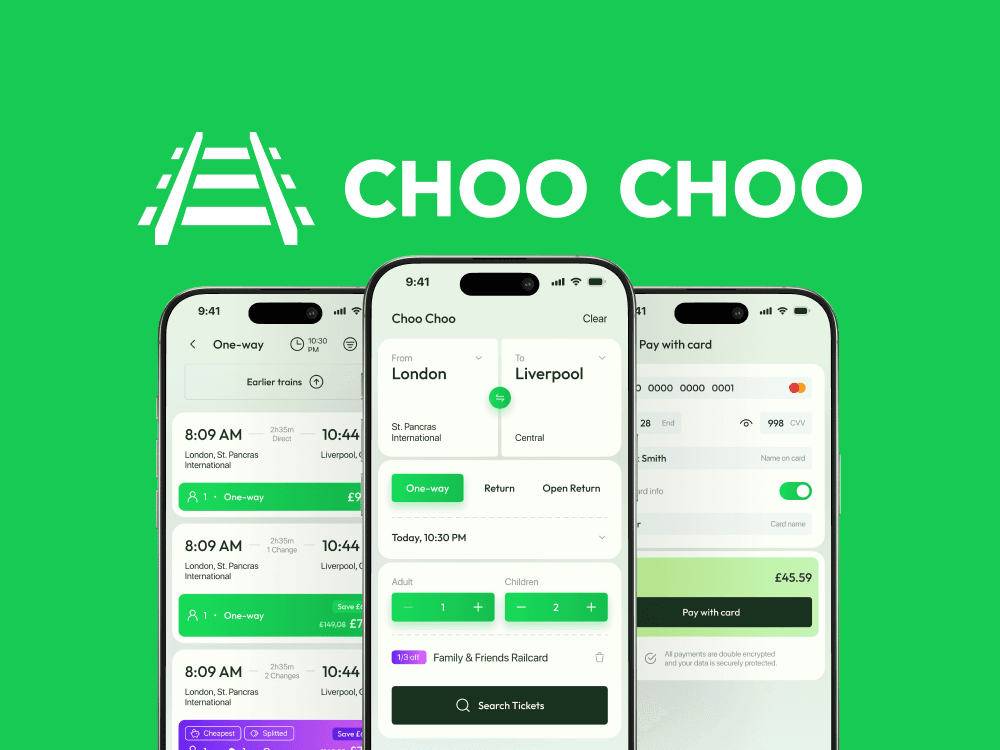
Choo Choo, a startup modernizing rail ticketing, used DBB Software’s pre-built solutions for a mobile-first MVP. One developer:
Built a scalable backend in 2 hours with NestJS and pre-built modules.
Created a mobile app boilerplate in 6 hours with sign-up and payments.
The team delivered a custom app MVP in 12 weeks.
Why It Matters
Pre-built components deliver fast, scalable app development. For highly unique needs, consider custom development, but pre-built components get you to market with less hassle.
Custom Development: Maximum Control & Scale
Custom development lets you build custom a custom app tailored to your vision. This development approach offers unmatched control for software development, but it’s a bigger investment. Here’s why it’s ideal for ambitious startups in 2025.
Pros: Why Custom Excels
Custom development powers unique, scalable apps:
Total Flexibility: Code from scratch for unique features.
Scalable Design: Built for enterprise-level growth.
Full Ownership: No vendor lock-in.
Cons: Custom’s Challenges
Custom software development comes with trade-offs:
High Costs: Development costs require a skilled development team; however, there are ways to reduce these costs.
Longer Timeline: Months for complex app development.
Popular Stacks: Top Picks
These fuel custom application development:
Node.js, React: Flexible for web and mobile apps.
AWS, Kubernetes: Scalable cloud for high-traffic custom apps.
Case Example: Bookis’ Marketplace

Bookis, a second-hand book platform, worked with DBB Software to scale their custom app for sustainability. They needed better UX, content management, and new features.
The development team delivered:
Front-End: Responsive UI with TypeScript, Vue.js, and Next.js.
Back-End: 2M+ book catalog with a custom scraper.
Integrations: Stripe payments, Strapi CMS, and BankID verification.
Results:
$4M GMV: Strong financial growth.
450,000+ Users: Growing user base.
Sweden Expansion: Reached new markets.
Why It Matters
Custom development unlocks limitless software development for a standout custom app. If time’s tight, pre-built components can speed up app development.
Learn More about DBBS Pre-Built Solutions
Discover how DBBS Pre-Built Solutions can accelerate the development of MVPs and complete products by up to 50%.
Read More

Pick Your Path: How to Choose the Right Approach in 2025
Your startup’s custom app is ready to shine, but which development approach fits best in 2025? No-code development, low-code development, pre-built components, or custom development? Your choice depends on your goals, budget, and timeline. Here’s how to pick the right path for your software development, avoiding traps like vendor lock-in or scalability issues.
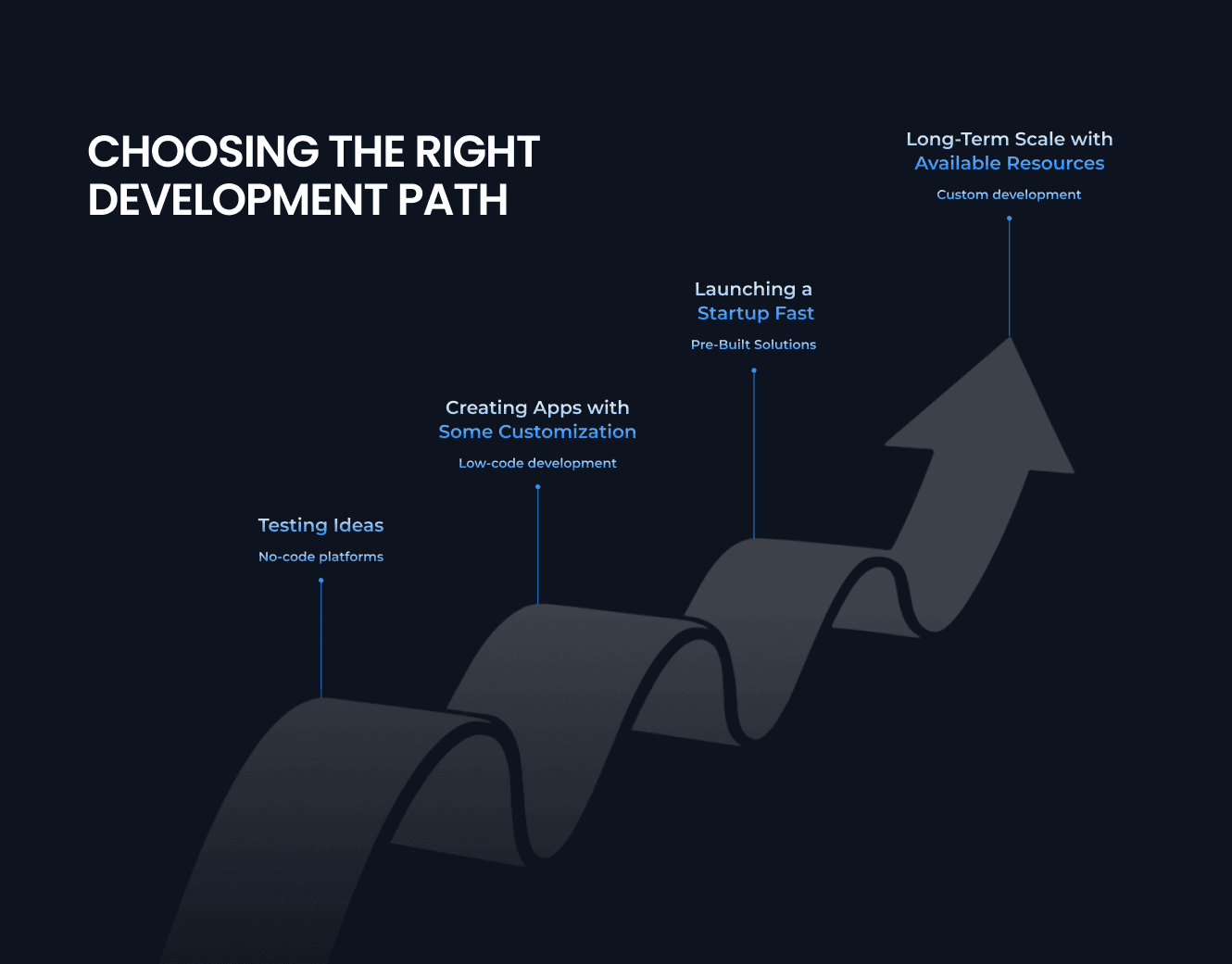
If You’re Testing an Idea
Got a spark you need to validate fast? No-code development is your go-to:
Launch an MVP in days with no-code platforms like Bubble, no single line of code needed.
Low development costs make it perfect for non-technical founders.
If You’re Building Internal Tools or Mid-Sized Apps
Need functional apps with some customization? Low-code development strikes a balance:
Build in weeks with low-code platforms like Mendix, blending visual tools and light coding.
Enables collaboration between business users and your development team..
If You’re Launching a Startup and Need Reliable Features Fast
Want a scalable app without starting from scratch? Pre-built components deliver:
Cut development time by 50% with tested modules from DBB Software.
Scalable and cost-effective for rapid app development.
If You’re Aiming for Long-Term Scale and Differentiation
Dreaming big with a unique vision? Custom development is your path:
Build custom features with full flexibility, coding from scratch for a custom app.
Scales for enterprise needs and avoids vendor lock-in, unlike no-code.
How to Decide
Choose your development approach with these steps:
Clarify Goals: Prioritize speed, scale, or uniqueness for your custom app development.
Check Resources: Assess budget and development team skills. No-code and low-code save development costs, while custom development needs more investment.
Plan for Growth: Start with no-code or low-code for MVPs, then shift to pre-built components or custom software development for scalability.
Mix and Match: Combine approaches, like starting with no-code tools and scaling with pre-built components or custom development.
Why It Matters
The smartest founders don’t choose just one forever. They sequence: start lean with no-code, move to pre-built for scale, and invest in custom when the product is proven. That way, you’re not rebuilding blindly — you’re evolving with your growth.
Make Sure You Pick a Proper Development Path
Book a call with our Business Development Advisor to receive an audit of your idea and personalized recommendations on how to move your project forward with DBB Software.
Book a Call
Build for Growth with Confidence
Your startup’s custom app is the key to turning your vision into reality in 2025. Whether you’re launching with no-code development, iterating with low-code development, scaling with pre-built components, or perfecting with custom development, the right development approach sets you up for success. Here’s how to move forward with confidence, avoiding pitfalls like scalability issues or vendor lock-in.
Launch and Learn: No-code platforms and low-code platforms let you test ideas fast.
Scale with Strength: Pre-built Solutions from DBB Software cut development time by up to 50% and ensure growth.
Stand Out: Custom software development delivers a unique custom app.
Partner Smart: At DBB Software, our development team blends pre-built components and custom development to launch your app development quickly while building for long-term success.
No-code and low-code development kickstart your journey, but pre-built components and custom development drive scalable growth and product-market fit. Choose your path and let DBB Software’s expertise accelerate your software development to hit the market fast and thrive in 2025.
FAQ



Fullstack .NET / C# Developer
Most Popular