
How to Add AI to a SaaS Product Customers Already Rely On
Product development
Updated: November 6, 2026 | Published: November 5, 2026

Key Takeaways
Adding AI to a live SaaS product can change who processes customer data, what customers need to know, and what they can switch off, even when the interface barely changes.
Use AI only where uncertainty helps, such as interpreting a request or matching meaning, and keep permissions, tenant data, business rules, and transactions in code, because a prompt can't enforce them.
Give AI the least authority the job needs. Each feature needs the controls of every level it touches, from reading a request to changing product state.
Decide before launch how each AI feature fails: keep existing workflows available where a non-AI path exists, and stop safely or hand off when the workflow depends entirely on AI.
Release AI in small, reversible steps under an expand-or-stop rule written in advance, and know what one successful request costs before you decide how AI shows up on the bill.
Adding AI to an existing SaaS product is rarely just a model-integration decision. It also affects the commitments you've already made to paying customers. When Microsoft added Anthropic models to Copilot, it applied different default settings for commercial customers in the EU, EFTA, and UK than elsewhere.
When you add AI to existing software that customers already pay for, the goal is to improve workflows without weakening their data boundaries, permissions, reliability, or billing predictability.
This guide covers the decisions from AI authority and architecture to customer obligations, failure handling, rollout, and pricing. It ends with a planning checklist.
The guidance draws on DBB Software's production AI hotel search and voice-agent care-request API, documented healthcare AI search and chatbot designs, and DBB's own AI chatbot.
How Much AI Does a SaaS Feature Need, and What Should It Be Allowed to Do?
Use AI only where a workflow needs interpretation, meaning-based matching, or generation. Keep permissions, pricing, business rules, and record changes under your existing application's control.
Start With the Smallest AI Component That Improves the Workflow
Add AI to systems that already work instead of replacing them. In DBB's healthcare search design, one model call turns a patient's sentence into filters for the existing search engine. The team deferred broader semantic search because of cost and additional sensitive-data exposure.
AppFolio kept its existing classifier and used an LLM for borderline cases, automating 75% of below-threshold cases with similar precision.
Add more AI infrastructure when the existing system cannot deliver the result, as in DBB's hotel search, which uses vector retrieval to match content by meaning.
Use an AI Authority Ladder to Decide What AI Can Affect
Rank each AI feature, whether it's an AI copilot, an assistant, or an agent, by what it can affect, and give it the controls of every level it touches. Each level adds a failure and a control in code:
AI role | Can affect | Failure | Control |
|---|---|---|---|
Interpret | How a request is read | Wrong filters or category | Closed schema, server validation, an editable result |
Retrieve | Which data is shown | Another customer's data | Tenant and permission checks in code |
Recommend | A user's decision | A confident wrong answer | Grounding and output checks |
Act | Product state | An invalid or harmful change | API rules, confirmation, audit log, undo |
The ladder measures authority, not incident severity. A cross-tenant data leak at Retrieve can be more damaging than a rejected action. The danger of excessive authority became clear when Replit's AI agent deleted a user's production data. As a result, the company separated development and production databases by default. OWASP calls this excessive agency.
For your first feature, favor interpretation or retrieval when the existing product can serve as a fallback and the outcome is measurable. Give AI authority to recommend or act only when the workflow requires it and the necessary controls are in place.
Which AI Feature Should You Build First?
Start where the AI only interprets or retrieves; your product can take over when the AI fails, and you already measure the outcome. The ladder can also guide your roadmap: start with lower-authority features where they solve the problem, and move to recommending or acting only when the workflow needs that authority and its controls are proven.
What Changes for Customers When You Add AI to a Live SaaS Product?
Adding AI can change who processes customer data, where it goes, what customers need to know, and what they can disable, even when the interface barely changes.
When incident.io added OpenAI to generate incident summaries, it gave customers 30 days to object to the new sub-processor. The company negotiated zero data retention and answered questions about storage, training, and encryption. Only a couple of customers objected.
Where Customer Data Goes When You Add AI
Map where customer data can reach: the model provider, logs, traces, retrieval indexes, and tools. Check processing regions, retention, and training terms before launch.
In DBB's patient chatbot design, model-provider retention and no-training terms are fixed before implementation, and observability traces exclude inputs and outputs.
What to Tell Customers, and What They Should Control
Your notification obligations depend on your contracts and data-processing roles. Under GDPR Article 28(2), a processor with general written authorization must inform its controller about proposed sub-processor changes so the controller can object. Specific authorization requires prior approval.
Decide which customers can enable or disable AI and what happens to their workflows when it's off. GitHub enabled new Copilot models by default for business customers after notice, but kept models outside its data-retention agreement disabled.
Under EU AI Act Article 50(1), providers of AI systems that interact directly with people must disclose that interaction unless it's obvious. Confirm which legal role applies to your product.
These obligations don't disappear for smaller SaaS companies. What can scale with customer size is the depth of security documentation and review, not the applicable legal duties.
AI Integration Architecture: Where the Model Sits in Your SaaS
Put AI behind your existing authentication, tenant, and API boundaries. Your application, not the model, decides which data can leave the product and which actions are allowed. This is central to integrating AI into existing software.
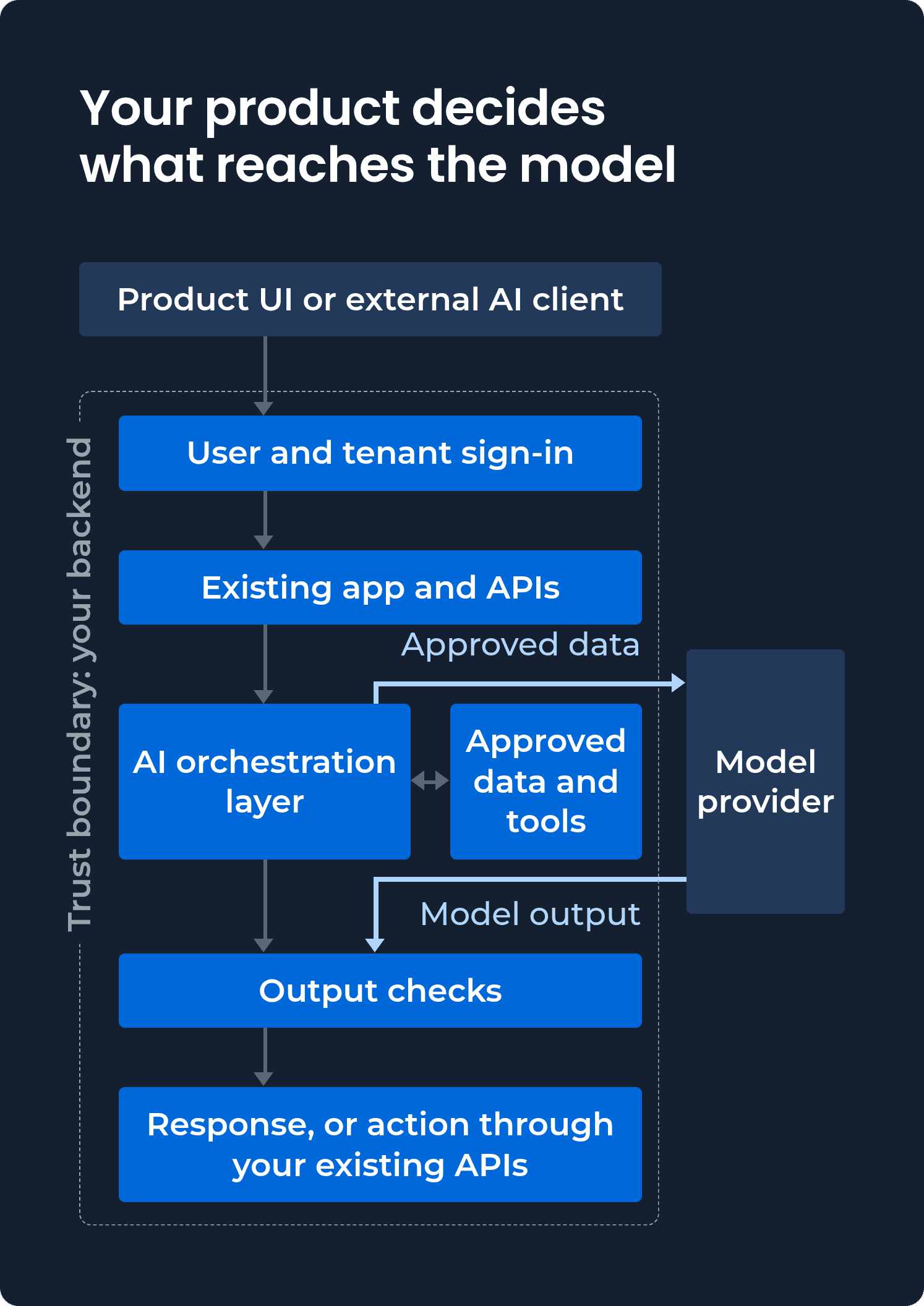
Route model calls through a controlled layer for provider access, logging, timeouts, and per-customer cost limits. The provider receives approved context; your application checks its output before using it.
How to Keep One Customer's Data Out of Another Customer's AI Answers
Take tenant identity from the authenticated session, never the prompt, and enforce permissions on every retrieval and tool call. In DBB's healthcare search design, tenant identifiers are injected server-side rather than exposed to the model. Apply the same isolation to logs and traces.
To verify isolation, trace a request from sign-in through retrieval. Tenant identity must never depend on model-generated values.
Treat Retrieved Content and Tool Output as Untrusted Input
Prompt injection occurs when instructions hidden in documents, tickets, or tool results steer a model. In the ForcedLeak attack, malicious instructions in Salesforce lead data caused an agent to send CRM information through an image request to an expired, allowlisted domain.
A prompt is not an enforcement mechanism. Keep tools within the authenticated user's effective permissions, restrict available tools and outbound destinations in code, and validate outputs and proposed actions server-side. Don't automatically load external links or images from untrusted model output. Require confirmation before consequential actions.
Send Every AI Action Through Your Existing APIs
Let AI request actions, but have your existing APIs enforce permissions, required fields, and business rules. In DBB's DispatchHealth voice-intake project, an AI agent creates care requests through the existing system's API. The same contract supports a second voice vendor without changing the underlying workflow.

Adding AI to a product your customers already use?
See how we integrate AI with existing SaaS permissions, APIs, and data boundaries while keeping your product's business rules in code.
Explore AI integration
Existing Search, RAG, or Live APIs: How Should AI Reach Product Data?
Use existing search when it already has the right query model, vector retrieval when meaning-based matching is missing, and live APIs when current product data must remain authoritative. Retrieval-augmented generation (RAG) supplies retrieved context to a model; it doesn't necessarily require embeddings or a vector database.
Approach | Best for | Trade-off |
|---|---|---|
Existing search plus AI | Structured product search | Limited to what your schema can express |
Vector retrieval | Matching meaning across content | A new data store to keep in sync |
Live APIs and tools | Current, authoritative data | Each tool needs its own permissions |
DBB's healthcare search design turns natural language into filters for existing search, without embeddings or a new datastore. A hotel search uses vectors for semantic matching, while DBB's chatbot retrieves current CMS content through tools. Hybrid keyword and vector search is another option when both exact terms and meaning matter.
Multi-Tenant RAG: Keep the Vector Index in Step With Permissions and Deletions
A vector index stores representations derived from customer data, so it needs its own access controls and deletion lifecycle. Enforce tenant and user permissions on every retrieval query, and propagate deletions and revoked access to the index.
OWASP recommends permission-aware vector retrieval. Before launching a multi-tenant RAG feature, delete a test record and revoke a user's access. Confirm that neither remains retrievable within the time your privacy terms require.
What Should Happen When the AI Is Wrong, Slow, Manipulated or Down?
Decide how each AI failure is handled before launch. Keep existing workflows usable when AI is unavailable; AI-dependent workflows need a safe stopping point or manual handoff.
In DBB's healthcare search design, provider errors, invalid outputs, timeouts, and an open cost breaker all fall back to classic search. The AI round trip has a 900-millisecond latency budget at the 95th percentile and a hard timeout of 1,500 milliseconds.
Failure | Safe behavior |
|---|---|
Invalid output | Validate the schema; retry within budget or fall back |
Slow or unavailable provider | Enforce a timeout; use the non-AI path |
Rate limit | Apply per-customer quotas and fall back |
Prompt injection | Enforce tool permissions and restrict outbound requests |
Model change | Pin versions and rerun evaluations before switching |
Budget exhausted | Stop model calls; fall back or refuse |
Pin named model versions where possible, but plan for their retirement. Treat every model switch as a release, even when your application code hasn't changed.
Assistants and agents may have no non-AI fallback. Cap their steps, time, and spending, then return a clear failure message or hand off to a manual process. For higher-risk workflows, fail closed: in DBB's patient chatbot design, an unavailable budget store means the turn is refused.
Before launch, block the model provider in staging. The test passes if the underlying product remains usable and AI-dependent workflows fail or hand off predictably.
How to Prove an AI Feature Works and Roll It Out to Paying Customers
Test AI on representative requests, release it to a controlled group, and expand only when predefined quality and product metrics hold.
Score it offline. Test ordinary requests, prompt injection, and cross-tenant access on a fixed evaluation set. Use redacted or look-alike data when customer terms require it, as in DBB's hotel search project. Check any LLM-based grading against human reviewers.
Release it small. Start behind a feature flag, then expose employees, opt-in customers, or a limited cohort. Decide beforehand whether pilot usage is billed.
Measure product value. Track workflow outcomes, not just model accuracy. DBB's healthcare search design uses search-to-profile-to-inquiry conversion.
Expand or roll back by a written rule. The healthcare design graduates if conversion matches or beats classic search and guardrails pass, iterates on mixed results, or retires the feature if results are flat or negative. Rollback is normal: Apple paused AI notification summaries for news and entertainment apps after false alerts.
Keep evaluating after launch. Add permitted production cases to your test set, version prompts and evaluations, and assign a quality owner. Model quality can fall without changes to your code: Anthropic documented infrastructure bugs that degraded Claude's responses.
Without a prewritten release rule and an owner for ongoing quality, your customers end up testing the feature for you.
What Does an AI Feature Cost, and How Should Customers Pay for It?
AI integration has two costs: building the feature, including its controls and evaluation, and running it. Estimate running costs per successful request, not just per model call.
Estimate the Cost of One Successful AI Request
Failed requests cost money too. Divide the cost per request by the share of results your product can use.
Take an AI search feature with one model call per search, 3,000 input tokens, 300 output tokens, and 2,000 searches per customer each month. Assume 80% of responses produce valid filters that get used; the rest fall back to classic search.
At Anthropic's October 2026 prices, the estimated model API costs are:
Model | Per request | Per success | Per customer |
|---|---|---|---|
Claude Opus 5.5 | $0.0180 | $0.0225 | $36.00 a month |
Claude Sonnet 5.5 | $0.0090 | $0.0113 | $18.00 a month |
Claude Haiku 5.5 | $0.00045 | $0.00056 | $0.90 a month |
These estimates exclude retrieval, monitoring, and other infrastructure. A smaller model saves money only if it passes your evaluations; actual costs also depend on token usage, including reasoning tokens.
Caching a shared 2,500-token prompt prefix, placed before tenant-specific data, can roughly halve model API costs when cache hits are frequent. Cache writes and expiration affect the savings. Multi-call assistants cost more because they make additional requests, often with growing context.
How to Price AI Features for Existing Customers
Choose a pricing model based on customer value, usage variability, and your cost per successful request:
Included in a plan: for AI that improves a core workflow.
Credits: for usage that varies substantially across customers.
Metered usage: charges for a measurable unit, but can discourage customers from using the feature.
Add-on: for a distinct feature only some customers need.
Define allowances, overages, and what happens at the limit before launch. Unexpected charges damage trust: when Cursor changed its Pro pricing in 2025, it had to refund customers and apologize for charges they hadn't anticipated.
What to Decide Before You Add AI to an Existing SaaS Product
Before approving an AI feature, agree on what it improves, what it can change, how it fails, and who owns it after launch.
Decision | The question |
|---|---|
Workflow | What customer task improves, and how will you measure it? |
Authority | Can AI interpret, retrieve, recommend, or act? |
Source of truth | Which system stays authoritative? |
Customer data | What reaches the provider, and under what terms? |
Customer terms | Does the DPA or sub-processor list need updating? |
Customer control | Can customers disable AI? |
Identity | Where do user and tenant permissions come from? |
Data access | Existing search, vectors, or APIs? How do deletions propagate? |
Failure | What happens when AI fails? |
Evidence | What must pass before rollout? |
Cost | What does a successful request cost, and who pays? |
Rollback | Can you disable AI without breaking the workflow? |
Ownership | Who maintains quality and model versions? |
Want these decisions written down for your feature?
Describe the AI feature and get a free scope document with its architecture, risks and milestones.
Get a free SaaS scope document
What to Do Next With Your First AI Feature
Start with one workflow AI can improve without handing permissions, business rules, or data boundaries to the model. DBB Software builds AI features around existing SaaS systems, with clients owning the code, prompts, and connectors DBB creates.
Still scoping? Get a free SaaS scope document. Ready to implement? Book a 30-minute call with our engineers.
FAQ


Content Marketing Manager, Researcher