
Cursor AI vs. Traditional Coding: What’s The Winning Approach
AI
Product development
Startups
Updated: September 2, 2026 | Published: September 22, 2025

AI can now generate and refactor code in seconds. That’s great for speed — but can you really trust it to build the backbone of your product?
By many accounts, AI tools are no longer experiments — they’re becoming the norm. A 2025 McKinsey survey found that 78% of organizations now use AI in at least one business function. In software engineering specifically, GitHub reports that nearly every developer has tried an AI coding tool at work.
But adoption comes with a catch: speed often hides risk. Veracode’s 2025 benchmark revealed that 45% of AI-generated code samples contained security flaws, even though they looked production-ready at first glance. In other words, AI helps you ship faster — but it also increases the need for careful review.
At DBB Software, our dev team already uses AI tools like Cursor and Copilot by default on every project. It’s our standard tool for accelerating boilerplate, onboarding, and everyday coding tasks.
So the real question isn’t whether to use AI — you already are. It’s: How do you balance Cursor AI with traditional coding practices so your product stays reliable, scalable, and compliant?
In this guide, we’ll compare both approaches across real-world factors, share practical examples, and give you checklists so you know exactly when to lean on AI — and when to let human-led coding take the wheel.
Quick Comparison: How Cursor AI and Traditional Coding Complement Each Other
Before diving into the details, let’s step back. Founders and tech teams don’t have time to debate theory — you want a clear view of how AI-assisted coding tools like Cursor compare with traditional, human-led development in practice.
Here’s a side-by-side snapshot of the trade-offs you’ll see explored throughout this guide:
Factor | Cursor AI (AI-Led) | Traditional Coding (Human-Led) |
|---|---|---|
Speed | 🚀 Rapid boilerplate and multi-file edits; faster onboarding for scoped tasks. | ⏳ Slower at start, but steady and reliable long-term workflows. |
Code Quality | ⚡ Generates “ready-looking” code that still needs human review and tests. | ✅ Clear structure, architecture, and intent; easier to extend and debug. |
Security | 🔒 Higher review burden; enforce scans, allow-lists, and provenance on AI-touched diffs. | 🛡️ Established standards and predictable threat-modeling; smoother compliance. |
Cost (Short-Term) | 💸 Lower build effort for MVPs, internal tools, and daily productivity. | 💰 Higher upfront time/cost (design, patterns, tests). |
Cost (Long-Term) | ⚠️ Added spend on reviews, AppSec, governance, and training; tech-debt risk. | 📊 Predictable maintenance and lower regression risk over time. |
Scalability | ⚡ Great for MVPs/experiments; weaker for complex/regulated systems. | 🏗️ Handles scale, integrations, and evolving requirements. |
Team Skills | 👩💻 Boosts throughput and onboarding; risk of over-reliance without strict review. | 🧠 Builds problem-solving, architecture, and compliance discipline. |
Best Fit | MVPs, prototypes, demos, internal tools, onboarding acceleration. | SaaS at scale, fintech/healthcare, unique algorithms — with AI assisting routine work. |
Biggest Risk | ❌ Security flaws or unmaintainable code without guardrails. | ❌ Slower MVP speed. |
The pattern is clear: Cursor AI accelerates you in the short term, while traditional coding secures your long-term foundation.
In the next sections, we’ll dig deeper into each of these factors — speed, quality, security, cost, scalability, skills, and use cases — so you can see where AI gives you an edge, where human-led coding still wins, and how DBB Software blends both into a hybrid approach.
Avoid Confusion With Professionals
Delegate technical details to industry experts and focus on the business side of your project. Contact our Business Development Advisor for a free project consultation.
Book a Call
When Cursor AI Makes Sense
Not “if,” but where to lean on Cursor. Below are the real-world situations where it delivers clear wins — plus mini playbooks you can copy-paste into your workflow.
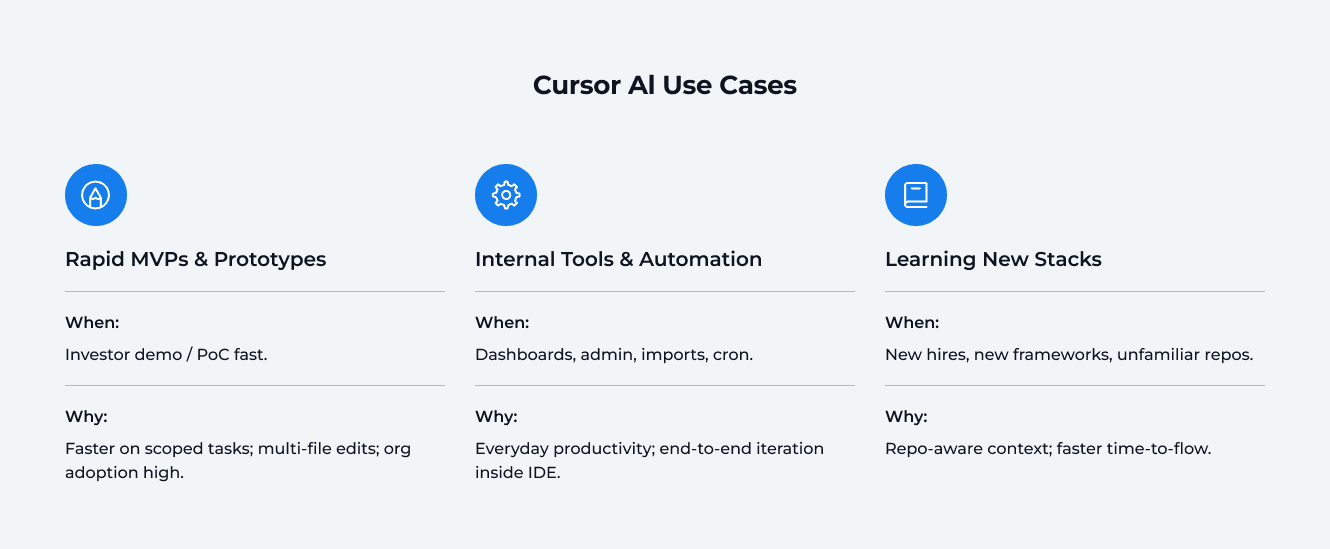
Rapid MVPs & Prototypes
When to use it: You need investor-ready demos or quick proof-of-concepts without burning weeks on scaffolding.
Why it works:
Scoped tasks get done faster. Controlled experiments on AI coding assistants show developers complete well-defined tasks ~55% faster — ideal for CRUD endpoints, auth flows, and test stubs you’d otherwise hand-code.
Multi-file changes without tab-spaghetti. Cursor’s Composer/multi-line edits and Agent modes let you generate features across files (routes, services, tests) from one instruction.
Internal Tools & Back-Office Automation
When to use it: Dashboards, admin panels, data importers, cron jobs — low-risk/high-iteration work that benefits from speed.
Why it works:
Everyday productivity boost. AI tools are now mainstream: 84% of developers use or plan to use AI, and 51% of pros use it daily — exactly the kind of repetitive work where Cursor shines.
End-to-end iteration loop. Start from Slack or tickets, generate code with Agent, and iterate with multi-line edits — all inside the IDE.
Guardrail to keep: Internal≠insecure. Scan AI diffs (SAST/DAST), enforce dependency allow-lists, and record AI-generated provenance in PRs.
Learning New Stacks & Onboarding to Existing Codebases
When to use it: New hires, new frameworks, or unfamiliar repos where context-gathering kills momentum.
Why it works:
Repo-aware understanding. Cursor’s codebase embedding model gives Agent “memory” of your repo, improving answers and edits across files — perfect for “where does this live?” questions.
Faster time-to-flow. Studies on AI assistants show speed gains and reduced cognitive load (focus on the interesting problems, not boilerplate). That translates to quicker onboarding and faster time-to-merge.
Actionable Tip (For All Three Cases)
Use Cursor where the scope is clear and the blast radius is low — then measure it. Track: time-to-merge, post-merge defect rate, and AI-assisted PR share each sprint. Keep security in the loop: multiple reports show that while AI accelerates delivery, it can also introduce more vulnerabilities if you skip reviews.
When Traditional Coding Is Better
Not every problem is a sprint. Some need a stable backbone, provable security, and crystal-clear intent in the codebase. These are the situations where human-led, standards-driven development stays in the driver’s seat — with AI supporting the routine work in the background.
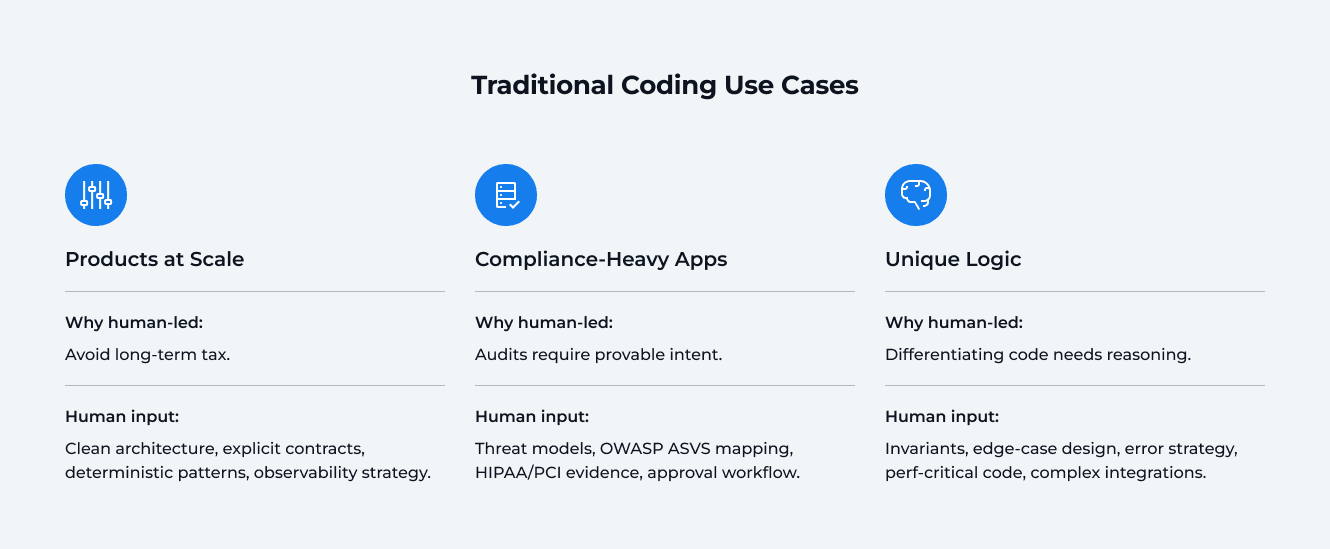
Products at Scale (SaaS, marketplaces, multi-user platforms)
Why human-led wins: Even an MVP requires a human touch to be perfected. At scale, the cost of a wrong abstraction or leaky boundary isn’t a bug — it’s a tax you pay for years. Traditional coding practices (clean architecture, explicit contracts, deterministic patterns) reduce regression risk and keep velocity high after launch. AI assistants can speed up the scaffolding, but they don’t replace system design or long-term maintainability discipline.
What to emphasize in practice
Treat architecture as a product: clear module boundaries, stable interfaces, and “golden paths” for data flow and errors.
Guard the repo with conventions: linting, typed contracts, shared libraries, and CI rules that fail on violations — then let AI help fill in the boring parts (tests, adapters).
Track lifetime health: complexity, churn, and time-to-merge per subsystem. If these trend up, pause and refactor with humans leading.
Compliance-Heavy Apps (Fintech, Healthcare, Enterprise IT)
Why human-led wins: Regulated software must demonstrate intent, controls, and traceability — not just working code. Frameworks like OWASP ASVS provide verification requirements for design, implementation, and testing; they’re easier to meet when humans author the core patterns and document decisions explicitly.
What the rules expect (examples)
HIPAA (health): security management process with documented risk analysis, remediation plans, sanctions policy, and regular reviews — records retained for six years. That demands auditable decisions and repeatable processes, not ad-hoc generations.
PCI DSS (payments): secure software requirements and secure coding training baked into the SDLC; developers must follow defined controls and verification steps.
Practical approach
Map requirements to code: threat models, data-flow diagrams, and ASVS control lists at design time — then generate low-risk code with AI under strict allow-lists and CI gates.
Preserve provenance: record where AI contributed, and require extra review on those diffs (SAST/DAST/IaC + dependency allow-lists). AI can speed delivery, but also increases vulnerability rates if governance is weak.
Unique Logic (Custom Algorithms, Complex Integrations, Proprietary Workflows)
Why human-led wins: Your competitive edge lives in the “crown-jewel” code — the parts that differentiate your product and carry IP risk. You want explicit reasoning, predictable behavior, and traceable decisions here. AI can suggest patterns, but humans should shape the model boundaries, error strategies, and performance trade-offs.
What to emphasize in practice
Design the invariants first: inputs, outputs, edge-case behavior, performance budgets.
Keep critical paths hand-written and reviewed by domain engineers; let AI assist with peripheral glue (adapters, DTOs, test fixtures).
Lock down dependencies: generated code can “hallucinate” packages or introduce weak defaults — tighten supply-chain controls and require allow-lists. Studies repeatedly show elevated flaw rates in AI-produced code, including OWASP Top 10 issues.
Actionable Tip
Use AI where the blast radius is low; use humans where intent must be explicit. For architecture, compliance, and the business-critical core, keep human-led design and reviews in charge — and wire CI to enforce secure coding standards (ASVS controls, HIPAA/PCI evidence, SAST/DAST/IaC, dependency allow-lists).
Your Team, Supercharged
A dedicated DBB crew that uses AI for speed and engineers for certainty. We handle the technical part — you keep focus on priorities.
Book a Call
Risks & How to Reduce Them
AI supercharges output — but it can also widen the attack surface if you treat generations like “ready-to-ship” code. Here are the biggest risks to watch for, plus the guardrails that keep you safe.
AI Risks to Watch For
Why this matters: As teams adopt AI coding tools, throughput goes up — and so does the chance of shipping issues that “look” correct but aren’t secure or maintainable. The most common failure modes: subtle vulnerabilities in otherwise clean-looking diffs, and dependency mistakes that open supply-chain doors.
More findings in AI-assisted code (volume + severity). Apiiro reports organizations ship code faster with assistants—but also see up to 10× more security issues, including spikes in privilege-escalation paths and architectural flaws as AI output scales. (apiiro.com)
“Production-looking” code with real vulnerabilities. Veracode’s 2025 benchmark found 45% of AI-generated solutions introduced known flaws (often OWASP Top 10 issues), with some languages faring worse (e.g., Java). Translation: it compiles and runs—but isn’t safe by default. (Veracode)
Package hallucinations → supply-chain attacks. LLMs sometimes suggest non-existent package names; attackers can publish look-alikes to hijack your pipeline (“slopsquatting”). Multiple analyses document the pattern and active exploitation paths. (www.trendmicro.com)
Safeguards If You Use Cursor AI
How to think about controls: Keep the speed, shrink the blast radius. Bake guardrails into your repo and CI/CD so every AI-touched change is scanned, constrained, and reviewable — without adding meetings or manual gates that slow you down.
Make security scanning non-negotiable. Run SAST/DAST/IaC (and SCA + secret scanning) on all AI-touched diffs. This catches insecure patterns, misconfigs, and leaked creds early—exactly where reports show risk rises with AI.
Lock dependencies with allow-lists: Block unknown packages and disable auto-install from prompts. Cross-check against trusted registries to neutralize hallucinated names and slopsquatting attempts.
Train devs on secure prompting: Teach “don’t vibe-code”: require parameterized queries, safe APIs, least-privilege defaults, and never paste secrets into prompts. Use OWASP GenAI guidance and LL(M) Top 10 as your baseline.
Keep provenance: Record where AI contributed (labels in PRs, commit tags, or SBOM annotations). Apply stricter review and automated checks to those changes.
Bottom line: Treat AI like powerful infrastructure. Instrument it (scans), constrain it (allow-lists & policies), and observe it (provenance & reviews). You keep the speed without inheriting avoidable risk.
Cost: Short-Term Gains vs. Long-Term Reality
AI feels cheaper up front because it removes a lot of manual lift (scaffolding, refactors, boilerplate docs). The trade-off is that you’ll spend more later on review, security hardening, governance, and coaching if you want that speed without surprises.
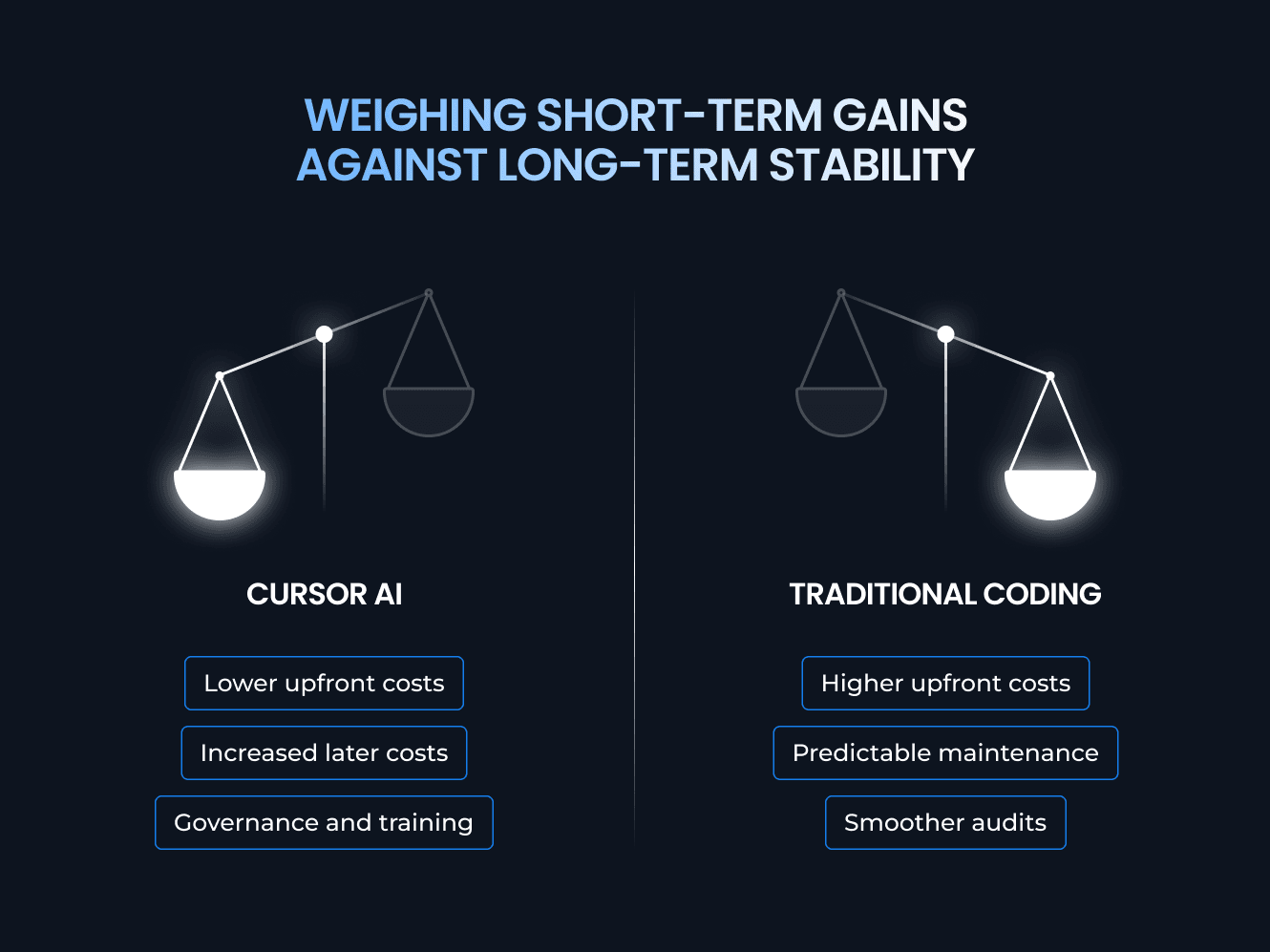
Cursor AI
Lower build effort and faster iteration on scoped tasks. Plan for:
Code review overhead: extra passes to validate logic, performance, and security.
AppSec & compliance checks: SAST/DAST, IaC scanning, dependency controls, SBOM updates.
Governance: tagging AI-assisted PRs, enforcing rules (no credentials in prompts, allow-listed packages).
Training & prompts: enabling devs to use AI safely and effectively.
Traditional coding
Higher upfront investment in architecture, patterns, tests, and docs, but steadier costs later:
Predictable maintenance: clearer boundaries and conventions reduce regression work.
Smoother audits: explicit design decisions and traceability shorten compliance cycles.
Fewer surprises: fewer risky dependencies and less “mystery code” to triage.
Metrics to Keep an Eye On
Track these per stream (AI-assisted vs. human-led) so you see the trade-offs, not just feel them:
Time-to-merge: median hours from PR open → merge.
Post-merge defect rate: bugs/rollbacks in the first 1–2 weeks after release.
Cost per merged LOC: (dev hours + review hours + security triage) ÷ lines merged.
Rework ratio: time spent fixing vs. creating in the last sprint.
Use Cursor AI to cut immediate delivery time, budget for the guardrails that keep quality high, and rely on traditional coding to anchor the parts of the system that determine your total cost over the long run.
The Hybrid Approach: Best of Both Worlds
Cursor AI isn’t optional anymore — it’s the default co-pilot for modern development. At DBB Software, we use Cursor (and companion agents) on every project to speed up repetitive tasks, generate boilerplate (as assistance for DBBS Pre-Built Solutions, when needed), accelerate onboarding, and keep momentum high.
But AI doesn’t replace traditional coding. Humans still design the system, make trade-offs, and sign off on security and compliance.
Rule of thumb: Cursor accelerates, but an expert development team secures and scales.
How We Run Hybrid
Here’s how we combine Cursor’s speed with human-led engineering judgment—day in, day out.
AI for momentum: boilerplate, scaffolds, tests/fixtures, simple CRUD, docs, refactors, code migrations, internal tools.
Humans for intent: domain models, architecture boundaries, data contracts, performance-critical paths, security-sensitive code, compliance features, incident-prone areas.
What the co-pilot actually does at DBBS
These are the concrete places AI shows up in our workflow—and how we wrap it with human review.
AI code review, shift-left:
AI reviewer runs on every pull request with custom rules (security, performance, dependency hygiene, error handling, logging).
AI provides the first pass; maintainers own architectural decisions and final acceptance.
AI-assisted test automation:
Playwright MCP server generates and maintains E2E tests.
QA prepares a detailed test plan (flows, edge cases, domain rules) that the agent uses as context to build page objects, selectors, and scenario suites.
AI to streamline daily dev work:
Summarize PRs for reviewers; first PR review to flag potential regressions.
Build dependency graphs to find all usages of a function/module across the codebase.
Plan and implement features: draft a step-by-step dev plan, then have the agent help implement each step (adapters, tests, docs, small refactors).
Debug faster: agents propose hypotheses, trace error paths, and suggest instrumentation.
Clear split of responsibilities
Think of AI as the backline accelerating delivery, and humans as the lead ensuring correctness, coherence, and compliance.
Cursor AI (Back vocals): Generate routes/services/tests, adapters/DTOs, repetitive refactors, draft docs; explore unfamiliar APIs/frameworks and propose edge-case tests; assist large-scale renames/migrations with multi-file edits.
Traditional coding by developers (Main singer): Define architecture, invariants, error handling, SLOs, data retention/security; decide dependency strategy, observability, rollout plans, performance budgets; validate threat models, compliance evidence, code reviews, and final acceptance.
Our hybrid workflow
A lightweight loop that keeps speed high without sacrificing safety.
Design first: humans sketch architecture, contracts, and guardrails.
Generate safely: Cursor drafts code within allow-listed deps and repo Rules.
Auto-check: CI runs SAST/DAST/IaC, SCA/secret scanning on AI-touched diffs.
Review & refine: humans review AI diffs, tighten logic, document intent.
Prove it: merge behind feature flags, with observability and rollback plans.
When to switch from AI to human-led
Use these triggers to hand the wheel back to engineers before risk compounds.
Crosses a service boundary or changes a data contract.
Touches auth, payments, PII, or regulated workflows.
Puts performance budgets at risk (latency/QPS/memory).
Spans multiple repos or needs transactional guarantees.
Guardrails We Keep On
Speed is great, but safety is non-negotiable. These controls stay enabled by default.
Policies & prompts: no secrets in prompts; dependency allow-lists; safe APIs by default.
Provenance: tag AI-assisted PRs for extra scrutiny.
CI enforcement: security scans on all AI changes; humans own critical sign-off.
Bottom line: Cursor = co-pilot. Traditional coding = captain. This combo keeps you fast today and safe tomorrow.
FAQ



AI/ML / Back-End / Tech Lead
Most Popular