
MVP Product UI/UX Design Guide for 2026
MVP
Product development
Startups
Updated: May 7, 2026 | Published: February 19, 2025

Key Takeaways
8-step design process – From market research to developer handoff, covering wireframes, prototypes, and UI kits
Cost breakdown – MVP design ranges from $1,500 (freelancer) to $100,000+ (enterprise agency), with timeline estimates
Deliverables checklist – Know exactly what you'll receive: wireframes, prototypes, UI kits, and design specs
Real-world examples – Learn from Figma, Notion, and DBB Software's Choo Choo case study
Common pitfalls – Avoid feature creep, skipped testing, and inconsistent design
Quality evaluation – Checklist to assess any design work before development begins
What is MVP UI/UX design? It's the process of creating a user-centered interface for your Minimum Viable Product. You focus on core functionality, intuitive navigation, and visual consistency, without over-engineering features you haven't validated yet.
Why does this matter? Studies show that 70% of businesses fail due to poor UX, and 94% of first impressions are design-related. For startups, design is the foundation that determines whether users stay or leave.
As Steve Jobs put it:
"Design is not just what it looks like and feels like. Design is how it works."
This guide is for startup founders, product managers, and anyone building their first MVP. You'll learn the complete process: from wireframing to developer handoff, with cost breakdowns and real-world examples.
You've validated your idea. Now you need to turn it into something users can actually touch, click, and love. The challenge? Building a design that's polished enough to impress – but lean enough to launch fast.
Before You Start: Briefing Checklist
Before hiring a designer or agency, prepare these materials. A clear brief leads to better results and fewer revision rounds.
What to Prepare
Product description – What does your product do? What problem does it solve?
Target audience – Who are your users? Age, profession, tech-savviness, pain points
Core features list – The 3–5 essential features your MVP must have (not a wishlist)
Competitor examples – 2–3 products you admire (and what you like about their design)
Brand assets – Logo, brand colors, fonts (if you have them)
Content samples – Real text, images, or data that will appear in the product
Budget range – Be upfront about what you can invest
Timeline constraints – Any hard deadlines (investor demo, launch date, etc.)
Questions to Answer
Before your first meeting with a designer, have clear answers to:
What's the #1 action you want users to take in your product?
What makes your product different from existing solutions?
What's your definition of success for this MVP?
Who makes final design decisions on your team?
What's your process for providing feedback?
Pro tip: The more clarity you bring to the brief, the less time (and money) you'll spend on revisions later.
The takeaway? MVP design goes beyond aesthetics. It's the bridge between functionality and user experience – and it directly impacts your chances of success.
So, how do you actually createa great MVP design? Here's the step-by-step process.
8 Steps to Create a Winning MVP UI/UX Design
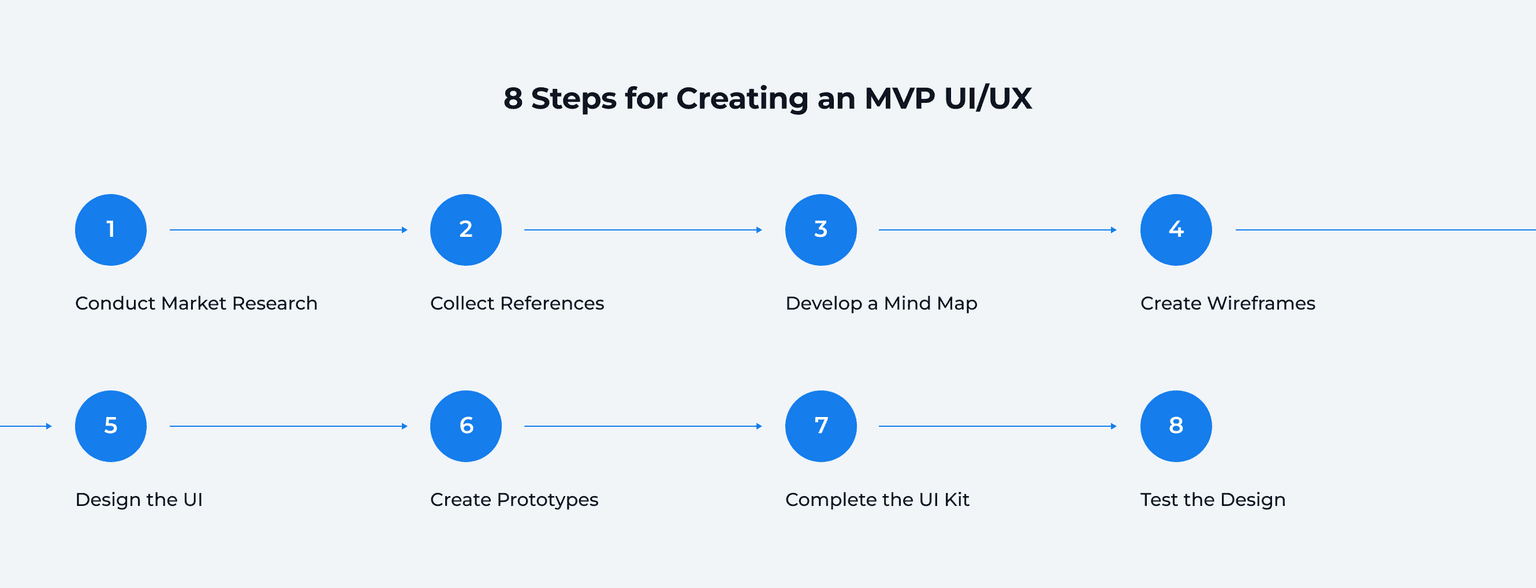
The main goal is to develop a design that meets core user needs while allowing for rapid iterations based on real-world feedback. The following steps cover the complete process for creating an impressive MVP UI/UX design, from initial research to developer handoff.
1. Market Research & User Personas
You want to understand your target audience and their needs. There are different ways of gathering this information:
Surveys and interviews
Competitor analysis
User behavior analytics
This data helps you identify design features to prioritize and pain points to address. Tools like Google Trends, Hotjar, or user behavior analytics platforms can offer valuable insights.
Alan Cooper, inventor of design personas and the author of About Face, calls personas "the single most powerful design tool that we use."
For example, imagine you're working on a food delivery MVP. Research how users interact with competitors like Uber Eats. Focus on common issues, like unclear delivery tracking, to offer a better alternative.
2. Mind Mapping & User Flows
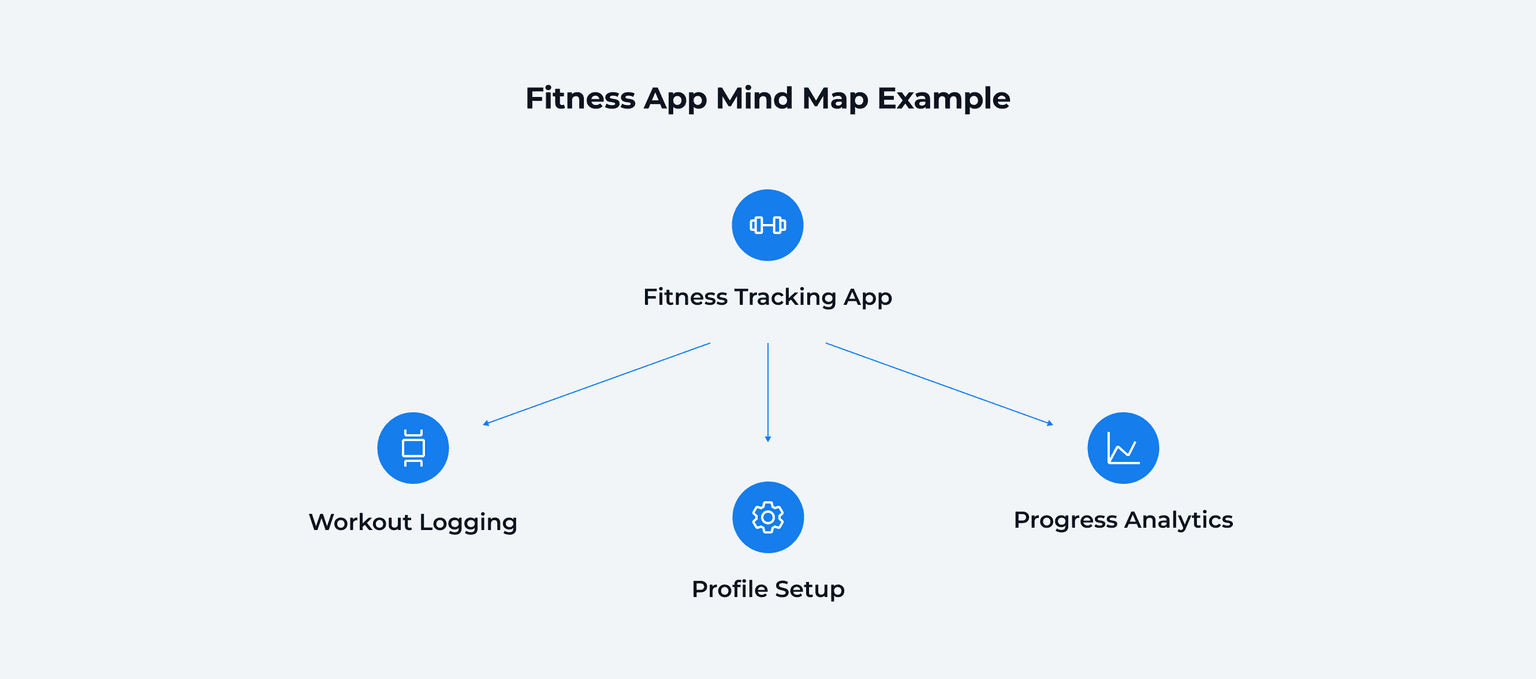
Use a mind map to organize your ideas, features, and user flows. Start with the core purpose of your MVP at the center and branch out to key features and user interactions. This ensures your designer covers every required aspect of the product.
For a fitness-tracking app, you might start with branches for:
"Profile Setup"
"Workout Logging"
"Progress Analytics"
Each branch can expand further – "Profile Setup" might include social media integration, avatar customization, and notification preferences.
3. Low-Fidelity Wireframing
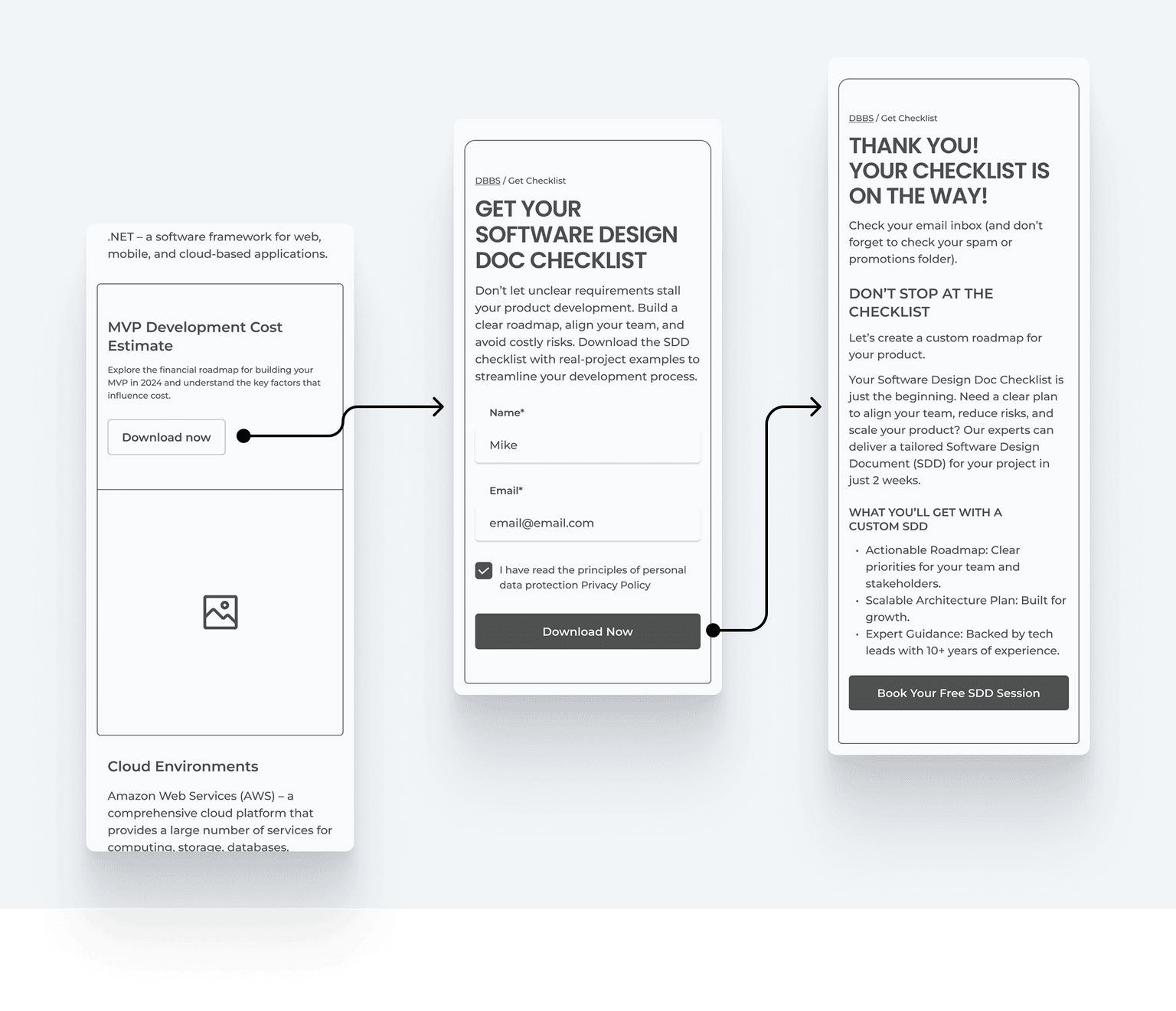
Transform your mind map and user scenarios into wireframes. These are simple layouts that showcase MVP UX design thinking without visual distractions. Figma, Sketch, and Adobe XD are excellent tools for quickly creating wireframes. However, AI-powered tools like Uizard and Relume can generate initial wireframes from text descriptions in seconds.A wireframe establishes:
Logical information hierarchy
Navigation flow
Content placement
Key interaction points
Here's an example of a simple wireframe for our website that shows the main idea behind wireframing and simplifies the overall development process.
4. Prototyping (Clickable Demos)
Prototypes are powerful tools in the early stages of development. They offer a preview of how users will interact with your MVP's UX and features, and help collect feedback on usability before investing in full-scale development.
At DBB Software, we emphasize the role of prototypes in refining a product. Early user testing with prototypes uncovers navigation and usability issues, minimizing the risk of costly UX fixes later.
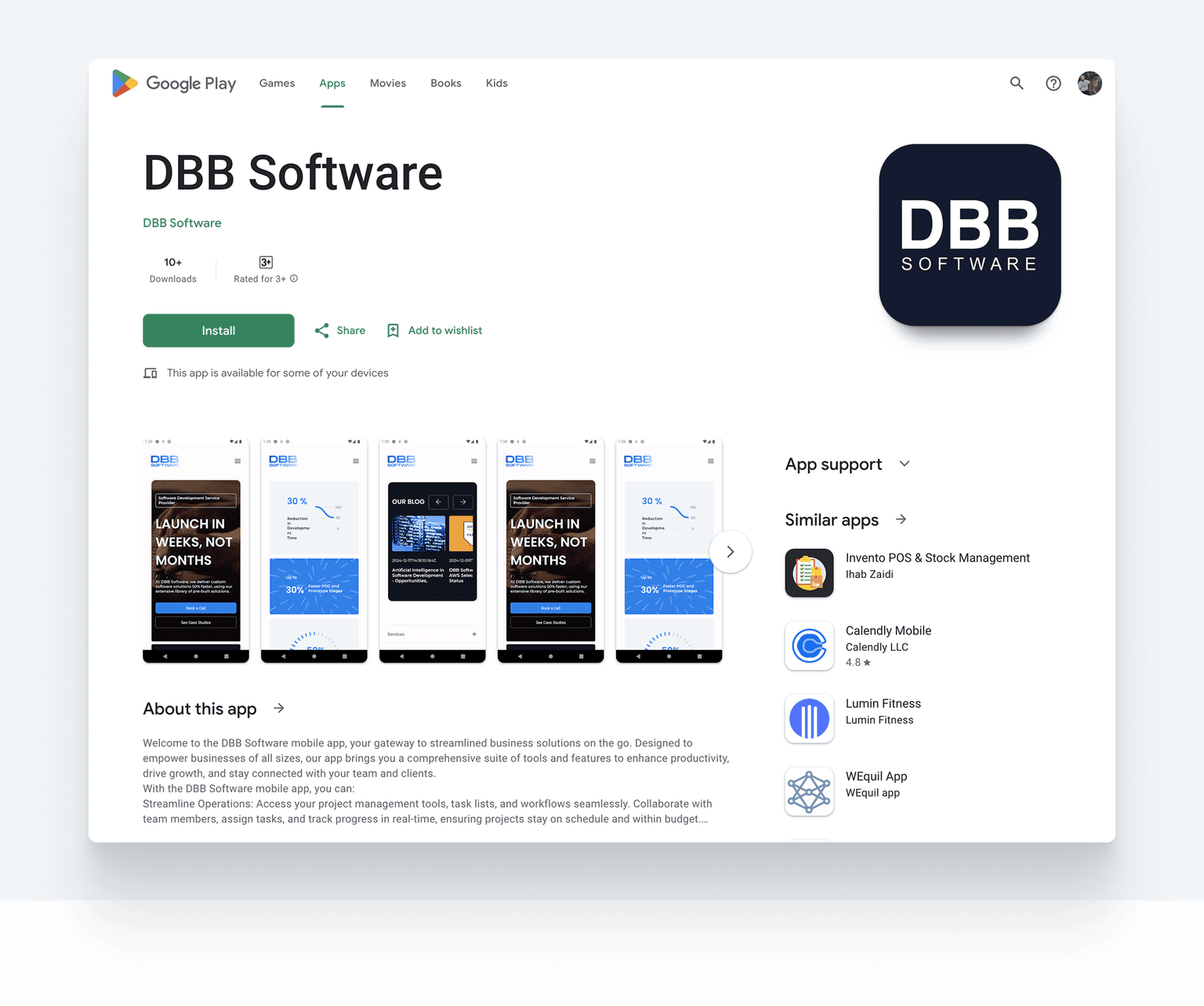
Leveraging our Pre-Built Solutions, which accelerate prototyping by up to 30%, we created a mobile app prototype to identify potential areas for improvement before moving to full development.
5. UI Design (Visual Style)
With wireframes ready, a designer can start working on MVP UI design in depth. The main task is to create or select visual elements:
Color schemes
Typography
Icons
Brand imaging
Remember that consistency is key – standardize these elements so your design builds trust and professionalism.
Additional tips for effective MVP UI design:
Prioritize minimalism to avoid clutter
Use readable fonts with proper contrast for accessibility
Align the UI with your brand identity while keeping it functional
6. Creating a UI Kit
MVP UX design should align with a speedy development process. Building a dedicated UI kit ensures design consistency and speeds up product iterations.A UI kit includes reusable components that designers and developers can access on demand:
Buttons and form elements
Icons and illustrations
Typography styles
Spacing rules
Color palettes
Our team actively collects UI elements within the Pre-Built Solutions repository. This evolving library allows us to speed up MVP design and complete product development by up to 50% while maintaining high quality.
7. Usability Testing
Testing is essential to ensure your product meets user expectations.
There's a technical name for the absence of user research: Guessing." – Jared Spool, founder of User Interface Engineering.
Based on established feedback loops, you'll continuously receive user information, which is a valuable source of insights into areas that require improvement.The idea is simple: receive information about an issue, test it, and roll out a new iteration to solve it.
For example, if users struggle with a checkout process in an e-commerce product, conduct A/B testing to find the best button placements or payment flows.
Pre-Built Solutions streamline testing with ready-to-use tools:
Cypress and Playwright for web apps
Detox for mobile apps
Unit tests for UI components
E2E tests for workflows
A/B tests for UX optimizations
8. Developer Handoff
The final step is preparing your design for development. A smooth handoff ensures developers can implement your vision accurately and efficiently.Key elements of a successful handoff:
Design specs – Document exact measurements, colors, fonts, and spacing
Asset exports – Provide all icons, images, and graphics in required formats
Interactive prototypes – Share clickable demos that show intended interactions
Component documentation – Explain how UI kit elements should behave
Responsive guidelines – Specify how designs adapt across screen sizes
Tools like Figma, Zeplin, or Abstract make handoffs seamless by auto-generating specs and enabling developer comments. AI plugins such as Builder.io can even export designs directly to React, Vue, or Tailwind code, thus bringing the gap between design and development.
Bonus Tip: Stop Thinking About the Final Product
Remember what MVP design means – less is more. This is a great way to validate ideas and start working on design and development. Your goal isn't perfection; that's why most MVPs feature a clean, functional design that’s fast to produce and works really well.
Every new feature adds complexity, increases development time, and complicates testing. Stick to the essentials of functionality and design to create space for user feedback that will guide future product iterations.
In summary, The 8 steps are: (1) Market Research, (2) Mind Mapping, (3) Wireframing, (4) Prototyping, (5) UI Design, (6) UI Kit Creation, (7) Usability Testing, and (8) Developer Handoff.
Discover Our Pre-Built Solutions
Find out more about Pre-Built Solutions, and learn how we deliver solutions up to 50% faster than competitors.
Read More

How AI Is Changing MVP Design in 2026
AI tools have transformed how startups approach MVP design. What used to take weeks now takes hours, and you don't need a design background to get started.
AI Design Tools That Actually Work
Uizard – The fastest path from idea to prototype. Upload a hand-drawn sketch or describe your app in plain English, and Autodesigner 2.0 generates multi-screen flows in seconds. It's perfect for startup founders who need to visualize ideas quickly without hiring a full design team. Free tier available; Pro starts at $39/month.
Galileo AI / Google Stitch – Google acquired Galileo AI in May 2025 and relaunched it as Google Stitch. The tool generates high-fidelity UI from text prompts or screenshots and outputs responsive, code-ready layouts rather than static images. Currently free through Google Labs.
Figma AI + Plugins – Figma's native AI features now auto-rename layers, generate realistic content (no more lorem ipsum), and remove image backgrounds in one click. Add plugins like Magician (acquired by Figma) for icon and copy generation, or Builder.io for one-click React/Vue code exports.
Relume – Generates complete website wireframes from a sitemap description. Useful for landing pages and marketing sites when you need structure fast.
What AI Can (and Can't) Do
AI excels at:
Speed – Generate 10 layout variations in the time it takes to sketch one
Exploration – Test multiple visual directions without committing design hours
Content – Auto-fill realistic text, images, and icons
Code handoff – Some tools output production-ready React, Vue, or HTML
AI still struggles with:
Brand nuance – Generic outputs need human refinement to match your identity
Complex flows – Multi-step user journeys require manual orchestration
Edge cases – Error states, empty states, and accessibility details need designer attention
Strategic thinking – AI can generate screens, but can't prioritize features or define your core value proposition
How AI Changes the Cost Equation
Teams using AI tools report 30-50% faster wireframing and prototyping phases. This doesn't eliminate the need for designers; it shifts their role from pixel-pushing to strategic decisions and refinement.
The new workflow: Use AI to generate initial concepts → Human designer refines and applies brand → AI assists with variations and handoff documentation.
For budget-conscious startups, this means you can validate ideas faster before committing to a full design engagement.
What You'll Receive: MVP Design Deliverables
When you hire a designer or agency, you should know exactly what you're paying for. Here's what a complete MVP design package typically includes:
Core Deliverables
Deliverable | What It Is | Why It Matters |
|---|---|---|
User Personas | Documented profiles of your target users | Ensures design decisions are user-centered |
User Flow Diagrams | Visual maps of how users navigate your product | Identifies friction points before design begins |
Wireframes | Low-fidelity layouts showing screen structure | Validates information hierarchy and navigation |
Clickable Prototype | Interactive demo you can click through | Tests usability before development investment |
UI Design Files | High-fidelity screens with final visual design | What developers will actually build |
UI Kit / Design System | Reusable components (buttons, forms, icons) | Ensures consistency and speeds up future work |
Design Specs | Documentation of colors, fonts, spacing, assets | Enables accurate developer implementation |
What to Ask For (By Project Phase)
Discovery phase: User personas, competitor analysis, user flow diagrams
Wireframing phase: Low-fidelity wireframes for all screens, navigation structure
Prototyping phase: Clickable prototype (Figma, InVision, or similar), usability test results
UI design phase: High-fidelity mockups, responsive variations (mobile, tablet, desktop)
Handoff phase: Complete UI kit, design specs, asset exports, developer documentation
Pro tip: Before signing a contract, ask your designer to specify exactly which deliverables are included at each milestone. This prevents scope creep and ensures you get what you need.
Now that you understand the process and deliverables, let's look at three core principles that make or break MVP design.
Three Principles That Make MVP Design Work
You can follow the 8-step process perfectly and still fail if you ignore these fundamentals. Here's what separates MVPs that succeed from those that don't.
1. Minimalism Over Features
Every element on screen should earn its place. For MVPs, "less is more" isn't a cliche – it's a survival strategy.
"Good design is as little design as possible. Less, but better, because it concentrates on the essential aspects." – Legendary designer Dieter Rams.
Over 63% of people access the internet via mobile devices. A cluttered desktop design becomes unusable on a phone. Start minimal, add only what users demand.
2026 Visual Trends to Consider:
Bento Grids – Modular layouts inspired by Japanese bento boxes. Asymmetric but balanced blocks that organize diverse content (stats, images, text) into scannable chunks. Apple and Samsung use this pattern extensively.
Dark Mode First – No longer optional. Users expect interfaces to automatically adapt to system settings. On OLED screens, dark mode also saves battery.
Spatial UI – Influenced by Apple Vision Pro and AR headsets, interfaces now incorporate depth, parallax effects, and layered elements that feel three-dimensional.
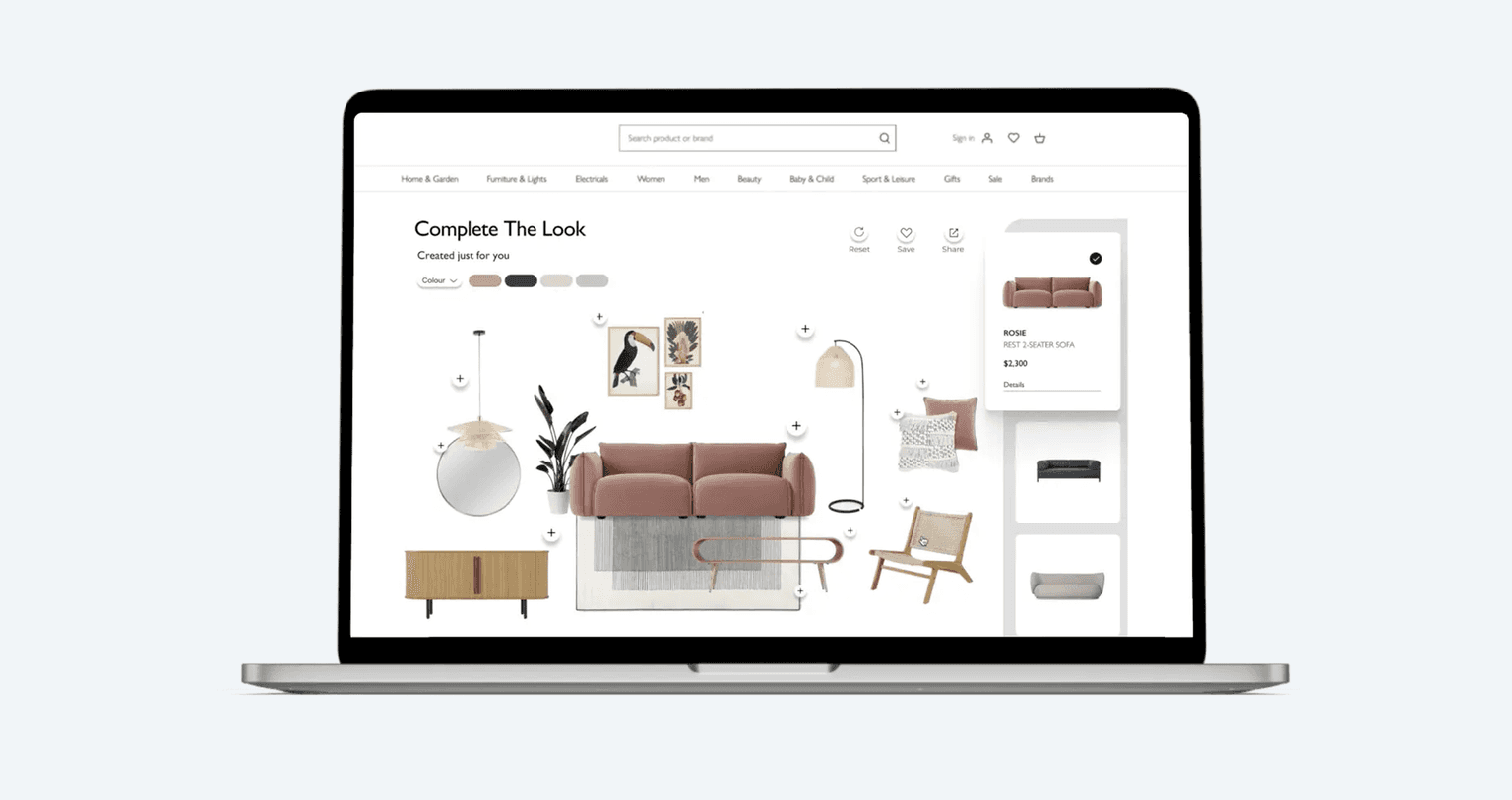
Case in point: DBB Software's furniture e-commerce platform features advanced AI visualization and 360-degree views – but uses a clean white UI. Complex functionality, simple presentation. Users spot features instantly because nothing competes for attention.
2. Two-Click Navigation
If users can't reach their goal in two clicks, you've lost them. Structure your MVP around one primary action – then make that action impossible to miss.
E-commerce MVP? Browse → Cart → Checkout. Three steps, done.
Fitness app MVP? Open → Log workout → See progress. No meal planning, no social features – those come after you've validated the core.
3. Micro-Feedback Everywhere
Users need to know their actions register. Without feedback, they'll assume your app is broken.
Add these interaction signals:
Form validation in real-time ("Password needs 8+ characters")
Loading indicators when processing takes more than 0.5 seconds
Success confirmations ("Item added to cart")
Error messages that explain what went wrong – and how to fix it
These small touches separate amateur MVPs from professional products.
Now let's talk numbers. What should you budget for MVP design?
Want to Create a Winning Design?
Get a UI/UX design audit to ensure your product resonates with users at first glance.
Book a Call
How Much Does MVP UI/UX Design Cost in 2026?
MVP cost, including design, depends largely on the complexity of your product, design quality requirements, and who you hire. The good news is: AI tools are compressing timelines and lowering the costs for early-stage startups. Here's a breakdown to help you budget effectively.
Budget + Timeline Matrix
Company Type | Timeline | Estimated Cost | What You Get |
|---|---|---|---|
Freelancer | 2-4 weeks | $1,500-$5,000 | Wireframes, basic UI design, limited revisions |
Small Agency | 3-6 weeks | $5,000-$15,000 | Full wireframes, UI design, prototype, basic UI kit |
Mid-Size Agency | 4-8 weeks | $15,000-$40,000 | Discovery, wireframes, prototype, UI design, UI kit, handoff docs |
Enterprise Agency | 6-12 weeks | $40,000-$100,000+ | Full research, multiple prototypes, design system, ongoing support |
What affects the price?
Complexity – A simple 5-screen app costs less than a 20-screen platform with animations
Fidelity level – Basic wireframes vs. high-fidelity prototypes with interactions
Revisions – More iteration rounds increase the total cost
Designer location – Hourly rates vary from $20–40/hour (Eastern Europe) to $100–200/hour (US/UK)
AI tool usage – Teams using AI-assisted design tools can reduce wireframing and iteration time by 30-50%, lowering overall costs
Quick calculation example:
An MVP with 10 screens, including wireframes, UI design, and a clickable prototype, typically requires 60-100 hours. At Eastern European rates ($30-50/hour), expect $1,800-$5,000 for design alone.
At DBB Software, we offer transparent pricing and leverage Pre-Built Solutions to reduce design and development time by up to 50%, helping you get to market faster without inflating your budget.
Theory is helpful, but examples bring it to life. Let's look at how successful companies approached MVP design.
MVP Design Examples That Prove Simple Works
Studying real-world successful MVPs shows how UI/UX design impacts product success. Below are our case studies and famous MVPs that focused on functionality over features.
DBB Software Case: Choo Choo Rail Ticketing MVP
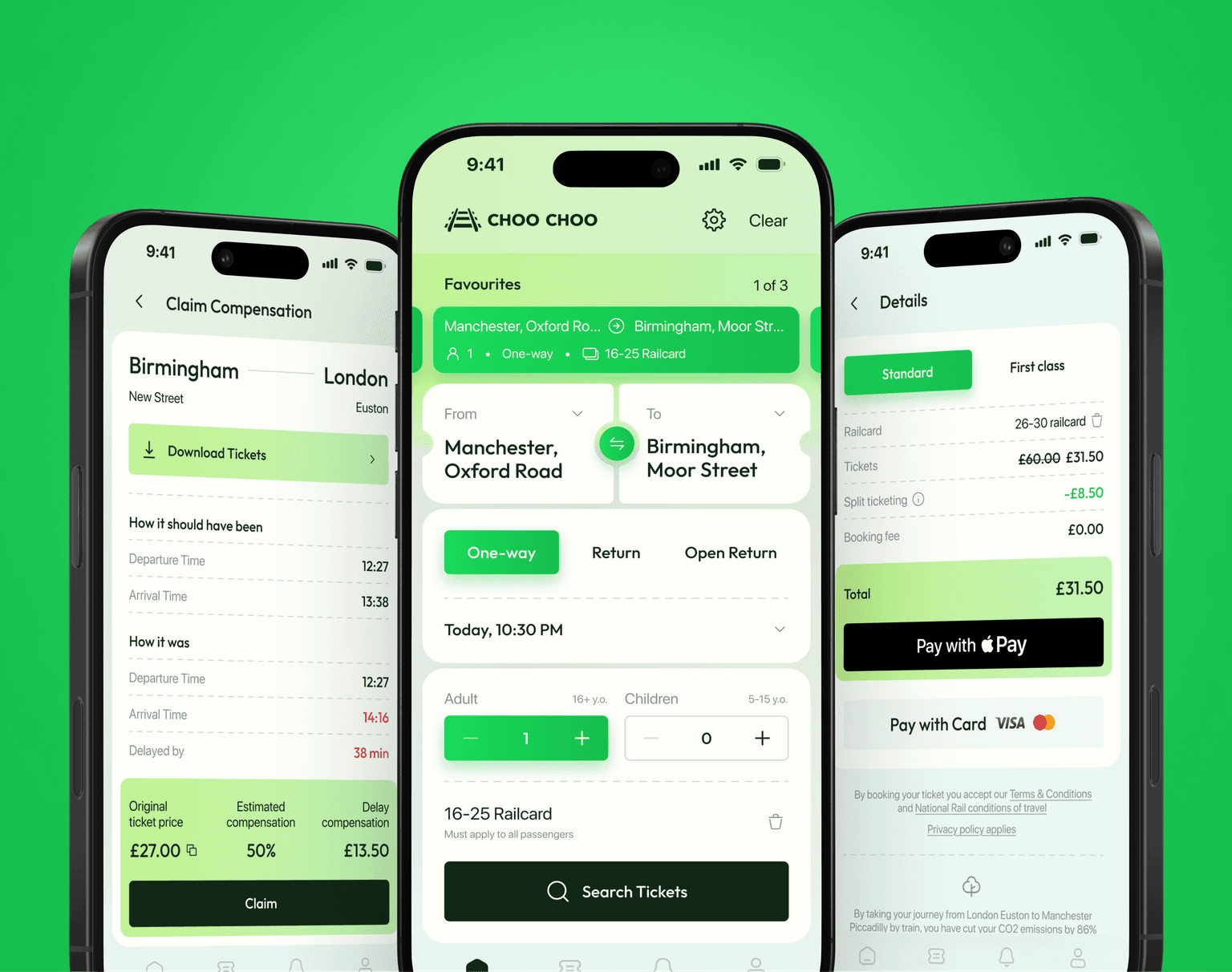
Choo Choo is a UK-based startup that wanted to disrupt outdated rail ticketing platforms. They came to DBB Software with a vision, and needed to move fast.
The challenge: Build a mobile-first MVP that could compete with established players, secure investor funding, and launch on both iOS and Android.
The approach:
User-centric UX – Optimized booking flow that reduced friction compared to legacy ticketing apps
Mobile-first design – Clean interface designed for on-the-go ticket purchases
Rapid prototyping – High-fidelity wireframes and a clickable prototype delivered early
The results:
12 weeks to MVP launch – Released on App Store and Google Play
Partnership secured – Design deliverables helped the founder secure Raileasy as a partner
1-day foundation setup – Pre-Built Solutions enabled mobile app foundation in 6 hours and backend in 2 hours
What startups can learn: You don't need months of design work to validate an idea. A focused MVP with clean UX can secure funding, attract partners, and get real users fast.
Figma: Patience + One Killer Feature (2015–2016)
Figma spent three years in stealth mode before launching – an eternity in startup time. But that patience paid off.
The MVP approach:
Core tools only – Basic drawing, vector editing, and prototyping. No bells and whistles
Browser-first – No downloads required. Open a link, start designing
One killer feature – Real-time collaboration. Multiple designers working on the same file simultaneously
Why the simple UI worked: Figma's interface was intentionally minimal. Every tool earned its place. Users didn't need tutorials and could start designing immediately.
The results: From 7% market share in 2017 to 90% by 2023. The free tier drove adoption, and the clean interface made switching from Sketch painless.
What startups can learn: You don't need every feature at launch. Nail one thing that competitors can't match, then make the experience so simple that users never want to leave.
Notion: Near-Failure to 6,000 Upvotes (2016)
Notion almost died in 2015. The founders burned through $150K, fired half the staff, and had to rebuild from scratch. What saved them? Obsessive focus on simple, elegant design.
The MVP approach:
Blocks system – One interface pattern for everything: text, images, databases, embeds
Clean aesthetic – No clutter. White space everywhere. The interface disappeared so users could focus on content
Narrow launch – Started with 500 Reddit power-users who gave brutal, honest feedback
Why the simple UI worked: Founder Ivan Zhao ran prototyping marathons in 2015, iterating until the interface felt effortless. The result was software that looked nothing like traditional productivity tools, and that was the point.
The results: 6,000 Product Hunt upvotes in 24 hours. The clean design became Notion's trademark and drove word-of-mouth growth.
What startups can learn: If your product requires a manual, you've overcomplicated it. Notion's "blocks" concept was radical, but the UI made it feel intuitive from the first click.
Common Mistakes in MVP Design to Avoid
Even experienced teams fall into these traps. Here's what to watch out for – and how to fix it:
1. Over-Designing (Feature Creep)
The most common mistake is trying to build a "complete" product instead of an MVP. You add one more feature, then another – and suddenly you've spent months on design before validating a single assumption.
The lesson of the MVP is that any additional work beyond what was required to start learning is waste, no matter how important it might have seemed at the time." – Eric Ries, author of The Lean Startup.
The fix: Define your core value proposition and ruthlessly cut everything else. Ask: "Can we launch without this feature?" If yes, remove it from v1.
2. Skipping User Testing
Designing in isolation is a recipe for failure. You might create a beautiful interface that nobody knows how to use.
The fix: Test early and often. Show wireframes to potential users. Create clickable prototypes and observe how people interact with them. Tools like Maze or UserTesting make this easy.
3. Ignoring Mobile Responsiveness
With over 60% of web traffic coming from mobile devices, designing desktop-first is a critical mistake.
The fix: Adopt a mobile-first design approach. Start with the smallest screen, then scale up. Test your designs on actual devices – simulators don't catch everything.
4. Inconsistent Visual Language
Random button styles, mismatched colors, and inconsistent spacing make your MVP look unprofessional and confuse users.
The fix: Create a simple UI kit before diving into design. Even basic rules for colors, fonts, and spacing create cohesion across screens.
5. Neglecting Onboarding
First-time users need guidance. Dropping them into a complex interface without context leads to immediate abandonment.
The fix: Design a simple onboarding flow that highlights your core value. Show users what they can do, and make the first action easy to complete.
How to Evaluate MVP Design Quality
Whether you're reviewing a designer's work or assessing your own, use this checklist to ensure quality before moving to development.
Design Quality Checklist
Usability
☐ Users can complete core tasks in 3 clicks or fewer
☐ Navigation is intuitive – no dead ends or confusing paths
☐ Error states are clearly communicated with recovery options
☐ Forms have clear labels, helpful placeholders, and validation feedback
Visual Consistency
☐ Colors, fonts, and spacing are consistent across all screens
☐ Buttons and interactive elements look and behave the same everywhere
☐ Icons follow a unified style (outline, filled, or glyph)
☐ Brand identity is recognizable but not overwhelming
Responsiveness
☐ Design works on mobile, tablet, and desktop breakpoints
☐ Touch targets are at least 44x44 pixels on mobile
☐ Text remains readable without zooming on all devices
☐ Images and icons scale appropriately
Accessibility Basics – 15% of the global population has some form of disability. Accessibility isn't a nice-to-have, and it's access to a larger market.
Important: The European Accessibility Act (EAA) took effect in June 2025, requiring all digital products sold in the EU to meet WCAG 2.1 Level AA standards. Non-compliance can result in fines up to €500,000 in some member states.
☐ Color contrast meets WCAG AA standards (4.5:1 for text) – use WebAIM's contrast checker
☐ Touch targets are at least 44x44 pixels on mobile
☐ Never rely on color alone to convey information (add icons or labels)
☐ Interactive elements are keyboard-navigable
☐ Images have alt text descriptions
☐ Form inputs have associated labels
Developer-Readiness
☐ Design specs include exact measurements, colors, and fonts
☐ All assets are exported in required formats (SVG, PNG, etc.)
☐ Component states are documented (hover, active, disabled)
☐ Responsive behavior is clearly specified
Pro tip: Run through this checklist at two points – after wireframing (for usability) and after UI design (for visual and technical quality).
What Happens After Design?
Design is just the beginning. Here's what comes next and how to prepare:
From Design to Development
Once your design is finalized, the typical next steps are:
Developer handoff – Share design files, specs, and assets with your development team
Technical planning – Developers estimate effort and plan the build sequence
Frontend development – Your designs become functional interfaces
Backend integration – Connect the UI to databases, APIs, and business logic
QA testing – Verify the implementation matches the design intent
Launch preparation – App store setup, hosting, analytics configuration
Timeline Expectations
MVP Complexity | Design Phase | Development Phase | Total Time to Launch |
|---|---|---|---|
Simple (5-10 screens) | 2-4 weeks | 4-8 weeks | 6-12 weeks |
Medium (10–20 screens) | 4-6 weeks | 8-12 weeks | 12-18 weeks |
Complex (20+ screens) | 6-10 weeks | 12-20 weeks | 18-30 weeks |
Keep Your Designer Involved
Don't disappear after handoff. During development, you'll need design support for:
Edge cases – Screens or states the original design didn't anticipate
Developer questions – Clarifying intended behavior and interactions
Design QA – Reviewing the built product against original designs
Iteration – Updating designs based on early user feedback
Budget for this: Allocate 10–20% of your design budget for post-handoff support.
Conclusion
MVP design is about balance – simplicity and functionality, speed and quality. You're not building a perfect product. You're building a foundation that validates your idea and sets you up for growth.
The process is straightforward: start with research, map user flows, create wireframes, build prototypes, and test extensively. Along the way, keep your design minimal, your navigation intuitive, and your feedback loops tight.
Great MVP design isn't about getting everything right on day one. It's about launching fast, learning from real users, and iterating toward product-market fit.
Ready to get started? Contact us for a comprehensive design audit.
FAQ



Fullstack .NET / C# Developer
Most Popular